

Insights, ideas and inspiration. A go to wisdom hub right here.
Featured Posts


Tutorials
7 Min Read

Latest Posts

General
5 min read
How to lazy load YouTube videos in WordPress to improve Core Web Vitals
Introduction
One of the projects required us to put more than twenty YouTube videos on a WordPress page. They had various videos showcasing their expertise, which were to be added to the website. But the problem is that embedded YouTube videos slow down web page load times. It also has an impact on the Core Web Vitals. After embedding the YouTube videos, we conducted the PageSpeed test, and as you could anticipate, the result was poor. We were dissatisfied with it because page load time is an important factor in the user experience of a web page. So let’s discuss the problem in detail and the solution.The Problem
Let’s create a simple page consisting of six videos. We are using the built-in Youtube Embed block in Gutenberg, where we just copy and paste the video's URL into the editor.
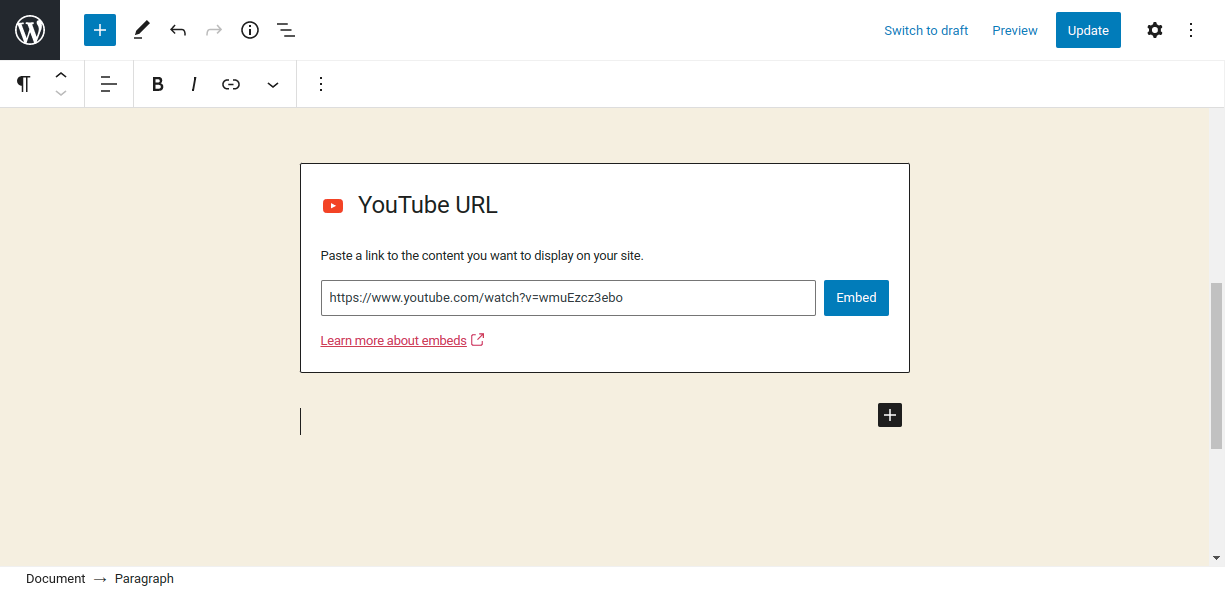
Screenshot 1: YouTube embeds Gutenberg Block
Here is a demo page that is similar to the client’s video gallery page, which we discussed before.
Screenshot 2: A page with six videos in a video gallery.
The PageSpeed score is 49 (Lighthouse data), which is very low.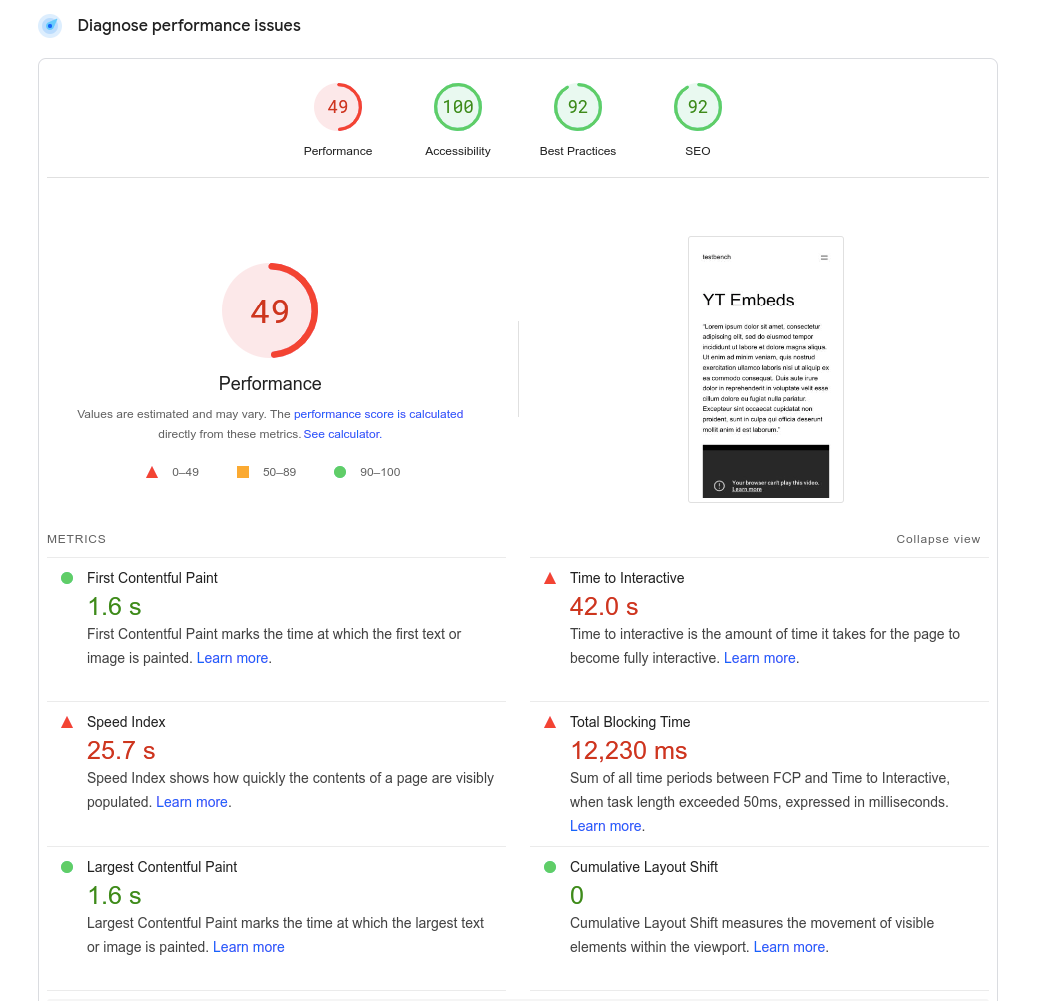
Screenshot 3: Low PageSpeed score
Let’s understand why the page load time is so high. When a YouTube video is embedded on a page, it requires many resources (mostly javascript files) to render it, which slows down the loading of the page. These resources are required to style the video player along with its functionality, such as pause, play, etc.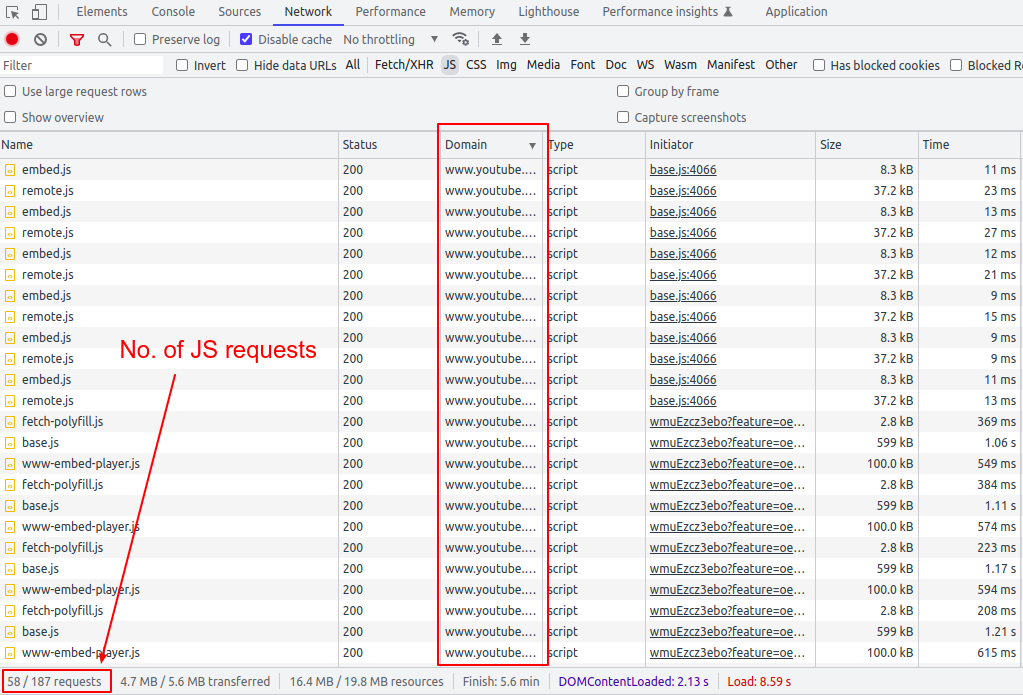
Screenshot 4: Number of JS requests
As we can see, fifty or more JS requests are made for the six videos embedded on the page (excluding the WordPress theme and third-party JS library requests). In general, the more videos that are embedded on a page, the heavier the page becomes, which makes the performance even worse.Solution
So now that we know the problem, let’s discuss the solution. To embed YouTube videos on a WordPress page, we are going to use the <lite-youtube> web component. It’s a custom HTML element that renders YouTube embeds faster. The awesome part is that it's just a vanilla web component with no dependencies. Let’s integrate this web component into WordPress.Step 1: Register and Enqueue Scripts
add_action( 'wp_enqueue_scripts', 'init_assets' ) ;

/**
 * Enqueue required assests.
*/
function init_assets(){
   $handle = 'lite-youtube';
  //You can also load this JS only for YouTube video-specific pages
   wp_register_script( $handle, 'https://cdn.jsdelivr.net/npm/@justinribeiro/[email protected]/lite-youtube.js', '', '', true );
   wp_enqueue_script( $handle );
}

add_filter('script_loader_tag', 'add_type_attribute' , 10, 3);
function add_type_attribute($tag, $handle, $src) {
   // if not your script, do nothing and return original $tag
   if ( 'lite-youtube' !== $handle ) {
       return $tag;
   }
   // change the script tag by adding type="module" and return it.
   $tag = "<script type='module' src='" . esc_url( $src ) . "'></script>";
   return $tag;
}
Step 2: Using the <lite-youtube> web component
Now let's use this web component. Pass in the video id as a parameter.<lite-youtube videoid="guJLfqTFfIw"></lite-youtube>
Copy and paste this code into Gutenberg HTML blocks, as seen in the below screenshot.
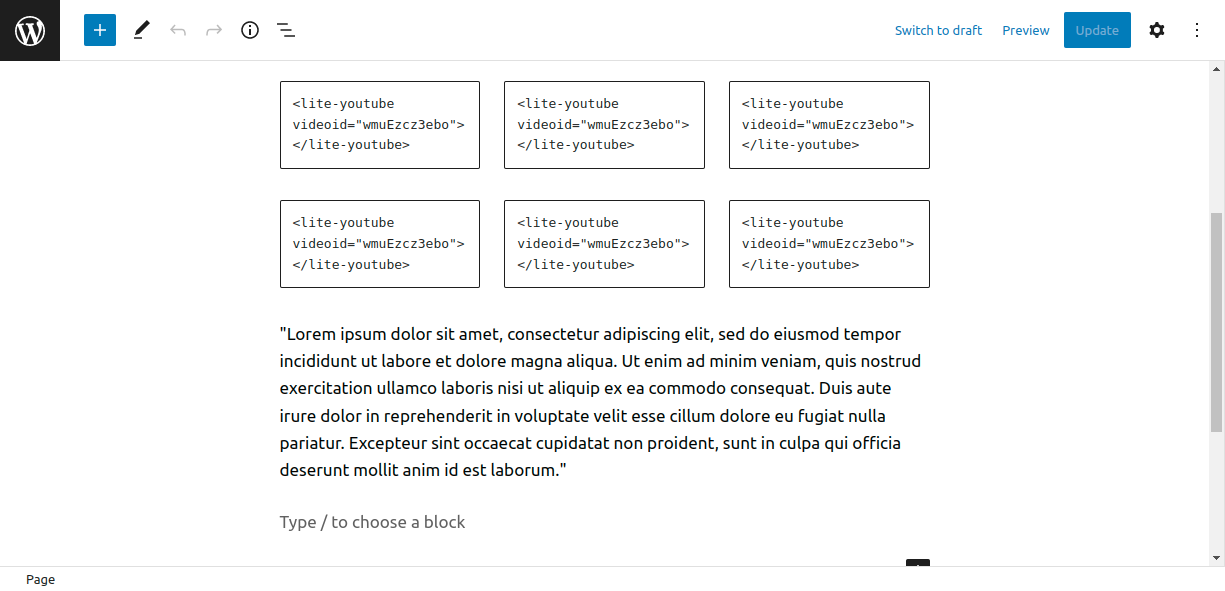
Screenshot 5: <lite-youtube> custom HTML block
The page looks like this.
Screenshot 6: A video gallery displayed using <lite-youtube> component
In comparison to the original page's 48 PageSpeed score, this page has a 99 PageSpeed score on mobile devices (Lab data from Lighthouse). On the surface, the page looks similar to screenshot 2, but the story behind the scenes is different.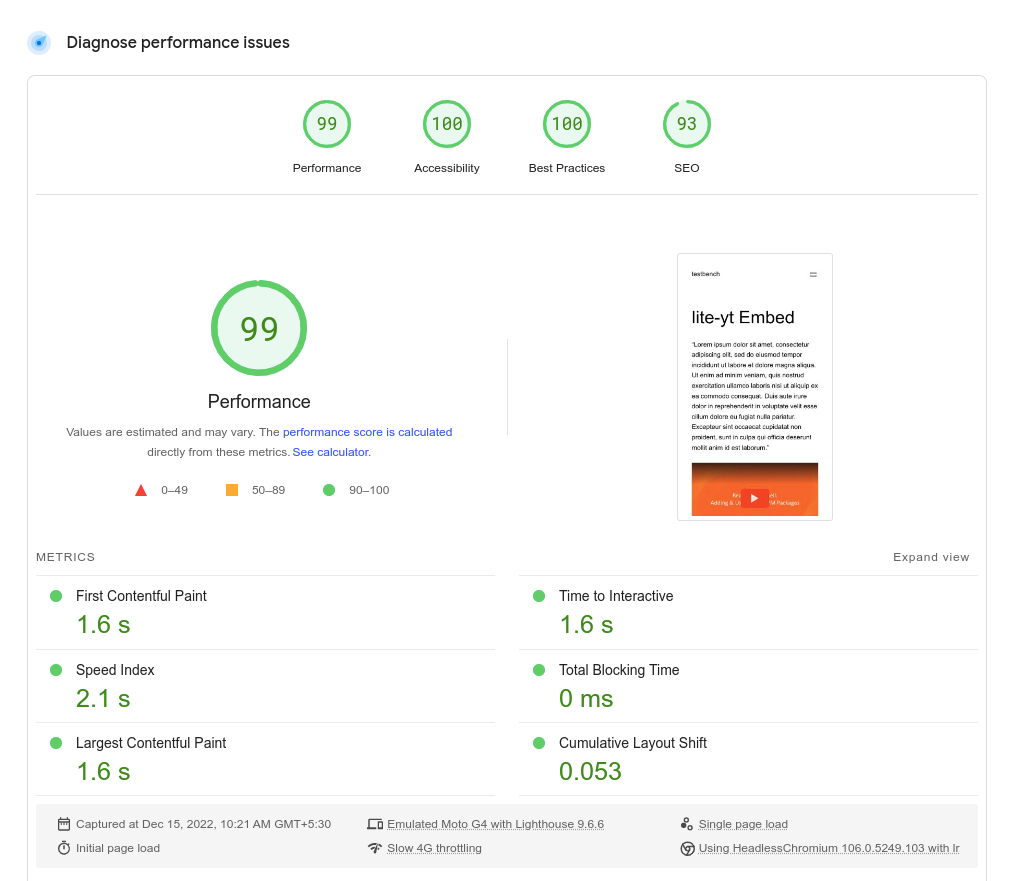
Screenshot 7: High PageSpeed score
Let’s see how this PageSpeed score was achieved. Instead of the YouTube iframe, the <lite-youtube/> web component only loads a thumbnail image of the video (as a placeholder) with a play button. Notice the slight difference between both play buttons in screenshots 2 and 4. Here is the code snippet.<div id="frame">
<picture>
<source id="webpPlaceholder" type="image/webp" srcset="https://i.ytimg.com/vi_webp/wmuEzcz3ebo/hqdefault.webp">
<source id="jpegPlaceholder" type="image/jpeg" srcset="https://i.ytimg.com/vi/wmuEzcz3ebo/hqdefault.jpg">
<img id="fallbackPlaceholder" referrerpolicy="origin" loading="lazy" src="https://i.ytimg.com/vi/wmuEzcz3ebo/hqdefault.jpg" aria-label="Play: Video" alt="Play: Video">
</picture>
<button id="playButton" aria-label="Play: Video"></button>
</div><div id="frame" class="activated"> <picture> <source id="webpPlaceholder" type="image/webp" srcset="https://i.ytimg.com/vi_webp/wmuEzcz3ebo/hqdefault.webp" /> <source id="jpegPlaceholder" type="image/jpeg" srcset="https://i.ytimg.com/vi/wmuEzcz3ebo/hqdefault.jpg" /> <img id="fallbackPlaceholder" referrerpolicy="origin" loading="lazy" src="https://i.ytimg.com/vi/wmuEzcz3ebo/hqdefault.jpg" aria-label="Play: Video" alt="Play: Video" /> </picture> <button id="playButton" aria-label="Play: Video"></button> <!-- iframe is injected--> <iframe frameborder="0" allow="accelerometer; autoplay; encrypted-media; gyroscope; picture-in-picture" allowfullscreen="" src="https://www.youtube.com/embed/wmuEzcz3ebo?autoplay=1&start=0&null"></iframe> </div>So, in short, when the page loads, the video has not been rendered. Instead, when the user clicks on the thumbnail image, only that video is dynamically inserted into the placeholder. This is known as lazy loading. Now let’s look at the number of requests made.
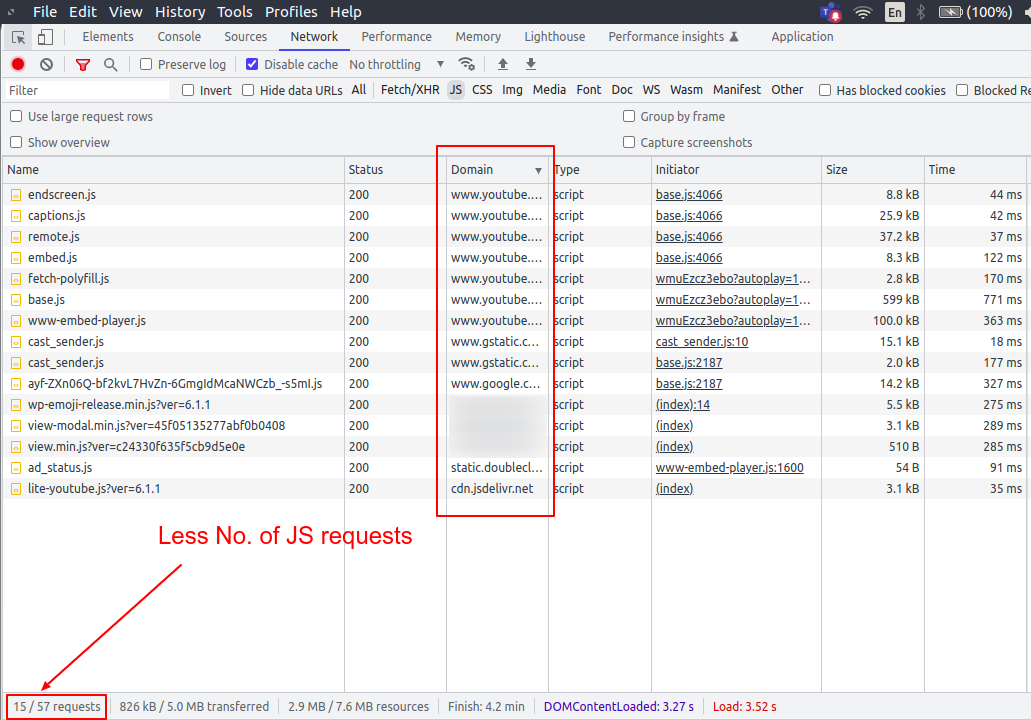
Screenshot 8: Less number of JS requests
On page load, the web components JS library is included (excluding the theme and third-party JS files). On subsequent play button clicks, requests are made to load the corresponding video. Here is the result of a visual comparison test performed on both pages.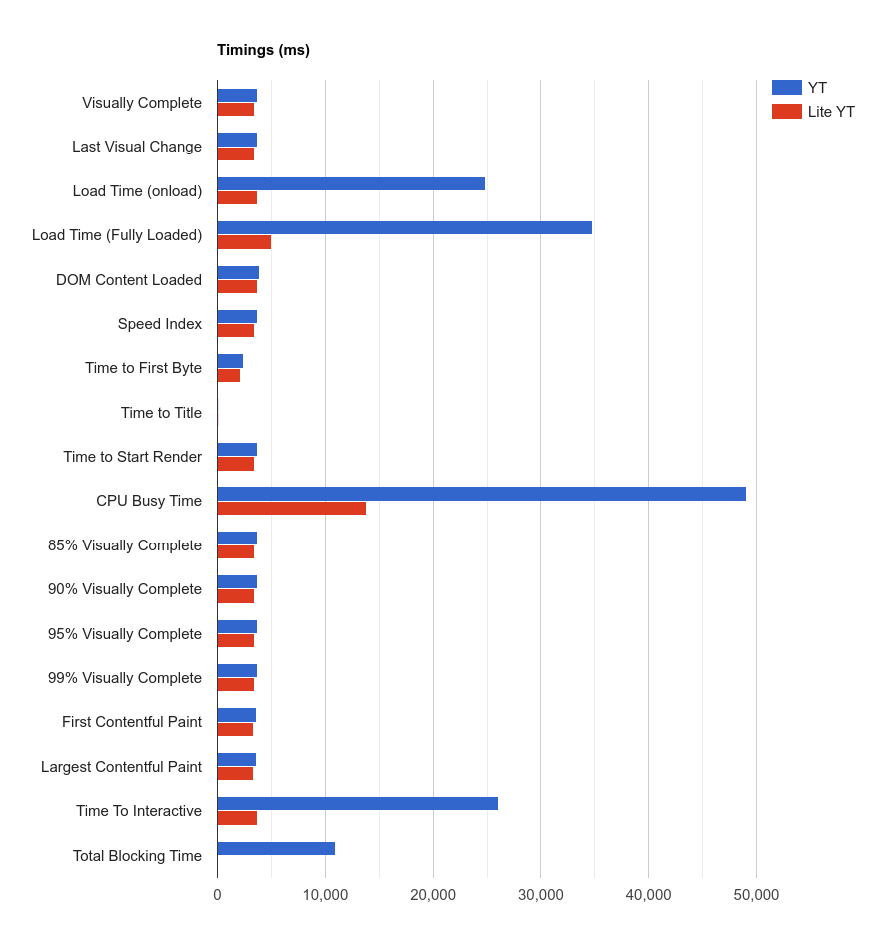
Screenshot 9: Timings compared of the two pages
It can be seen in the above screenshot, the timings are less for the <lite-youtube> web component compared to plain YoutTube embeds.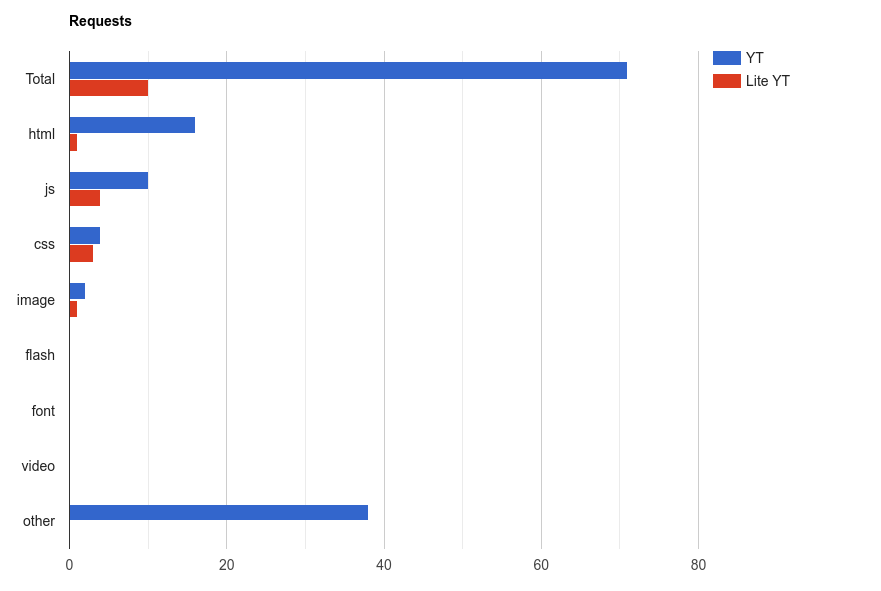
Screenshot 10:The number of requests compared between the two pages
The number of requests for the <lite-youtube> web component is lower than for plain YouTube embeds, as shown in the above screenshot.Conclusion
When you embed YouTube videos directly on a web page, it takes longer for the page to load, so it fails the Core Web Vitals test. The page load time is drastically reduced by using a lightweight web component <lite-youtube>. We compared Lighthouse (Lab) data from two pages: one with a direct YouTube embed and one with the <light-youtube> web component. Having said that, it's important to test and evaluate the Real User Monitoring (RUM) data, which represents the load times on actual user devices (over a 28-day period). That's it for this tutorial. If you need any help optimizing the Core Web Vitals of your WordPress website, talk to our web experts.
General
2 min read
(Secret) Santa is back at WPoets
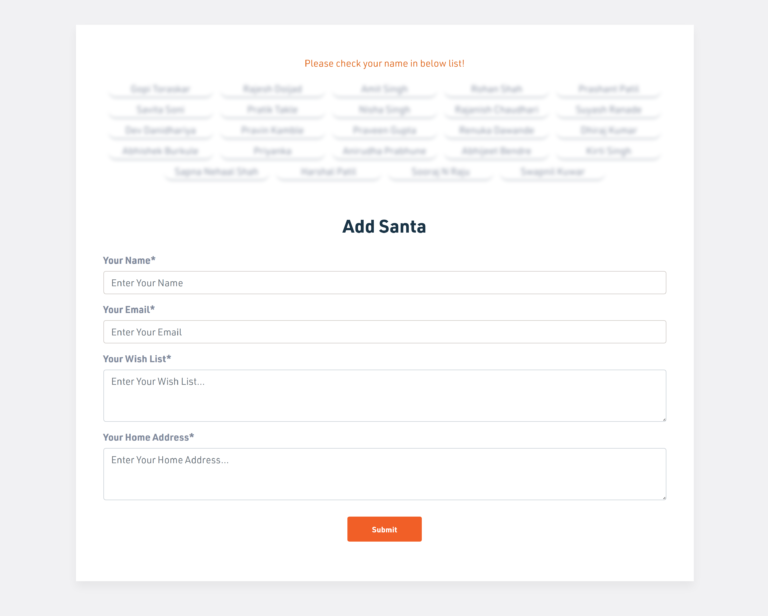
Team members added themselves as Santa
After the list was complete, team members were shared virtual Santa boxes to draw the person's name for whom they would be Santa. It was all fun and games. Everyone’s biggest challenge was to hold their calm until their gifts arrived at their doorsteps.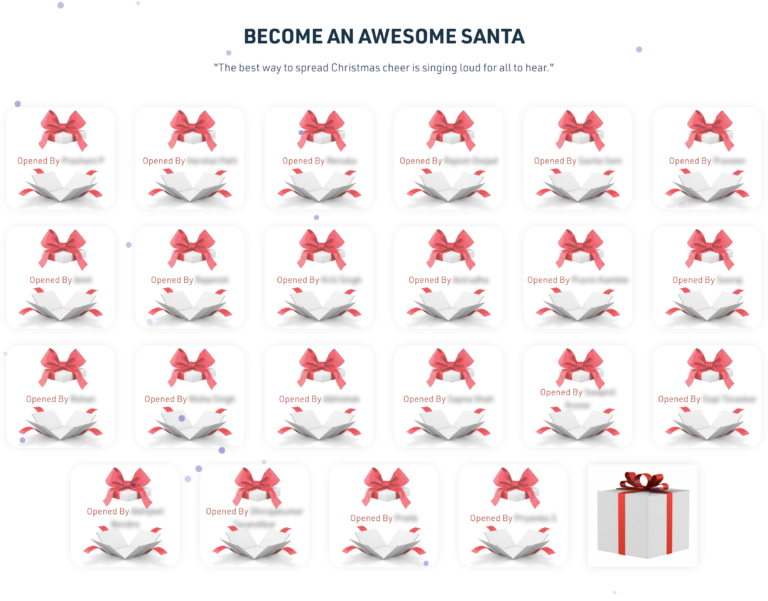
Secret Santa choosing a gift for a teammate
Finally, everyone started receiving their gifts one by one. The ones who were a little late had their eyes glued to the doors, watches, and calendars. But as said, "it’s never too late," gifts were received, and the team members shared the photos, expressing gratitude to their secret Santa. Gifts by secret Santa
 Some more secret Santa gifts
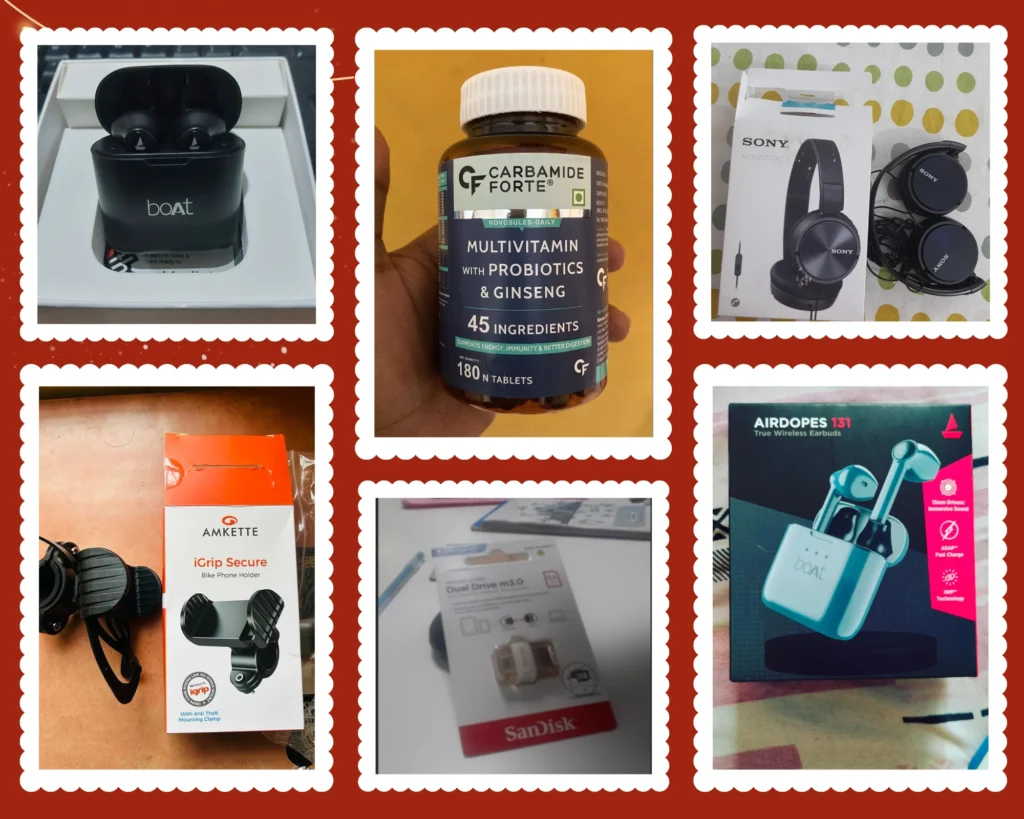 Some more secret Santa gifts (2)
 Some more secret Santa gifts (3)
General
5 min read
7 Ways You Can Improve WordPress Website Speed
How to check WordPress website speed
You don’t have to sit with a stopwatch to measure how long it takes for your site to load. There are tools that you can use to measure site speed and performance. These tools include:- PageSpeed Insights: PageSpeed Insights by Google captures the site’s mobile and desktop performance through different Web Vitals metrics. It also gives your site a score of 0-100 for both mobile & desktop, with clear explanations for improving the score. Here, you don’t get page loading time.
- Pingdom: Pingdom lets you check your website speed test with the option to choose from a list of servers worldwide. It gives you site grades and lets you know the exact load time.
- GTmetix: GTmetrix is comprehensive website optimization and testing tool. It grades your site and also lets you know the page load time.
- What is the size of the page you’re testing?
- Is the web page cached or not?
- How many requests does the page generate?
- Does the site load static or dynamic content?
1. Get a Good WordPress Hosting
 Website speed improvements start with your WordPress hosting. It is at the core of your site’s performance and directly influences the website loading time.
If you’re starting, you'll see a lot of shared hosting providers that sell their services as the "best" thing you can get. Here, you get unlimited bandwidth, email space, and even domains bundled into the package.
However, you may soon discover that shared hosting is limited and struggles during peak traffic hours. And that's why shared hosting plans are cheap.
You can get dedicated hosting, managed WordPress hosting, or a virtual private server(VPS) to solve the peak demand problem. These'll cost you more, but you'll get excellent service with fast server performance to boost your website loading times.
We recommend checking out DigitalOcean, SiteGround, and Bluehost. From there, choose the package according to your budget and requirements.
Website speed improvements start with your WordPress hosting. It is at the core of your site’s performance and directly influences the website loading time.
If you’re starting, you'll see a lot of shared hosting providers that sell their services as the "best" thing you can get. Here, you get unlimited bandwidth, email space, and even domains bundled into the package.
However, you may soon discover that shared hosting is limited and struggles during peak traffic hours. And that's why shared hosting plans are cheap.
You can get dedicated hosting, managed WordPress hosting, or a virtual private server(VPS) to solve the peak demand problem. These'll cost you more, but you'll get excellent service with fast server performance to boost your website loading times.
We recommend checking out DigitalOcean, SiteGround, and Bluehost. From there, choose the package according to your budget and requirements.
2. Optimize WordPress Database
 As your site grows, you’ll find your WordPress database filled with a lot of information. However, not all this information is needed to run your site optimally.
For example, the WordPress database contains pieces of information such as revisions, trashed posts, unused tags, deleted comments, etc. The server takes a little longer to get the user’s requests. In simple words, it slows down your website.
You can use plugins such as WP-Optimize or Advanced Database Cleaner to fix this. Both are excellent plugins and let you optimize the database with just one click. Moreover, they’re free to use.
As your site grows, you’ll find your WordPress database filled with a lot of information. However, not all this information is needed to run your site optimally.
For example, the WordPress database contains pieces of information such as revisions, trashed posts, unused tags, deleted comments, etc. The server takes a little longer to get the user’s requests. In simple words, it slows down your website.
You can use plugins such as WP-Optimize or Advanced Database Cleaner to fix this. Both are excellent plugins and let you optimize the database with just one click. Moreover, they’re free to use.
3. Use Optimized themes and plugins
 The WordPress ecosystem is huge, but only some of the available plugins/themes are optimized. If you use an unoptimized plugin/theme, you're bound to get problems, including slow load times.
That's why, to give your site the best possible way to load fast, you need to choose a theme and plugin that are properly coded and don't feature unnecessary features.
For themes, check out Themify, Astra, and StudioPress. And, for plugins, you can check out our 10 Must-Have WordPress Plugins for Business Websites.
The WordPress ecosystem is huge, but only some of the available plugins/themes are optimized. If you use an unoptimized plugin/theme, you're bound to get problems, including slow load times.
That's why, to give your site the best possible way to load fast, you need to choose a theme and plugin that are properly coded and don't feature unnecessary features.
For themes, check out Themify, Astra, and StudioPress. And, for plugins, you can check out our 10 Must-Have WordPress Plugins for Business Websites.
4. Use a Content Delivery Network(CDN)
 Website load times differ for different users across the world. This happens because your hosting server is located in one place and serves users worldwide.
To solve this, you can keep a copy of your site on a content delivery network(CDN) that is much closer to the user. It lowers website load times. The only limitation is that it stores static files, including CSS and JavaScript. This means your server will still do some work, preferably less, as static files are served through the CDN.
For CDN, you can use Cloudflare.
Website load times differ for different users across the world. This happens because your hosting server is located in one place and serves users worldwide.
To solve this, you can keep a copy of your site on a content delivery network(CDN) that is much closer to the user. It lowers website load times. The only limitation is that it stores static files, including CSS and JavaScript. This means your server will still do some work, preferably less, as static files are served through the CDN.
For CDN, you can use Cloudflare.
5. Use a Caching Plugin
 Whenever a visitor requests a webpage from your dynamic site, the server compiles and serves the request. This can cost you server performance and slow down your site.
However, you can use a cache plugin to speed up your WordPress site by saving up to 0.5-2 seconds of load time. The cache plugin creates a handy page copy and serves it to visitors without the need to generate a page every time.
There are plenty of good WordPress cache plugins you can try, including W3 Total Cache, WP-Optimize, WP Rocket, and WP Super Cache.
Whenever a visitor requests a webpage from your dynamic site, the server compiles and serves the request. This can cost you server performance and slow down your site.
However, you can use a cache plugin to speed up your WordPress site by saving up to 0.5-2 seconds of load time. The cache plugin creates a handy page copy and serves it to visitors without the need to generate a page every time.
There are plenty of good WordPress cache plugins you can try, including W3 Total Cache, WP-Optimize, WP Rocket, and WP Super Cache.
6. Reduce HTTP Requests
 Your WordPress site relies on multiple resources to load properly. Some of it is internally served by the server, while others are requested through external sources such as analytics services, typography, etc.
In an ideal scenario, you cannot completely stop external HTTP requests but can reduce them to improve your site’s speed. To reduce the HTTP requests, check which plugins or services are making the requests. Once found, try to disable them. You can also merge requests into one request to save time.
Your WordPress site relies on multiple resources to load properly. Some of it is internally served by the server, while others are requested through external sources such as analytics services, typography, etc.
In an ideal scenario, you cannot completely stop external HTTP requests but can reduce them to improve your site’s speed. To reduce the HTTP requests, check which plugins or services are making the requests. Once found, try to disable them. You can also merge requests into one request to save time.
7. Always Optimize Images
 Images give visitors a visual experience and engage them. If your post has the right images, it’ll perform and convert nicely. However, you need to optimize images so that it doesn’t slow the page down.
To optimize images, you can compress and re-size them through editing software. This will reduce the size significantly. You can also use an image optimization WordPress plugin such as Smush, EWWW Image Optimizer, or Imagify that takes care of image compression during upload.
Images give visitors a visual experience and engage them. If your post has the right images, it’ll perform and convert nicely. However, you need to optimize images so that it doesn’t slow the page down.
To optimize images, you can compress and re-size them through editing software. This will reduce the size significantly. You can also use an image optimization WordPress plugin such as Smush, EWWW Image Optimizer, or Imagify that takes care of image compression during upload.
Conclusion
Not all WordPress site owners understand the impact of speed and incur revenue loss. With our list of ways to improve site speed, you’re bound to get better load times, resulting in site growth in terms of visitors and revenue.
General
5 min read
5 Undeniable Signs Your Business Website Needs a Makeover
Introduction
Your website is one of the most critical assets your business has. It’s the first impression of your business. Most importantly, it's a 24/7 lead generation machine. Potential customers will visit your website, get information about the products and services that you offer, and decide whether they want to get in touch with you or not. Having said that, this critical asset is overlooked many times. To put things in context, we studied more than 1000+ companies' websites and found almost a third of businesses' websites were outdated and needed a complete makeover. Their design, content, site speed, user flow, updates, upgrades, maintenance, and overall user experience need to be seriously looked at. The websites weren't up to the mark as compared with current web standards and needed an overhaul. But the question is, how do you decide that your website needs an overhaul? What are the common signs to look for? This blog exactly discusses this. Here are the top five signs.1. Your website doesn't convert, hence it needs a makeover
 Imagine a visitor landing on your website through SEO or paid ads. The visitor is browsing through the site and has spent thirty minutes on your website but has not filled out the contact form or called the number you provided on the website.
S/he has gone through all your products or services, about us, and contact us pages but is still hesitant to contact you. Next, your website’s tab is closed and the visitor is never going to come back again. (Use visual analytics tools such as Clarity or Hotjar, which give information on how visitors are browsing your website.)
But the question is, why did the visitor not take the next step of contacting you?
Here are a few reasons,
Imagine a visitor landing on your website through SEO or paid ads. The visitor is browsing through the site and has spent thirty minutes on your website but has not filled out the contact form or called the number you provided on the website.
S/he has gone through all your products or services, about us, and contact us pages but is still hesitant to contact you. Next, your website’s tab is closed and the visitor is never going to come back again. (Use visual analytics tools such as Clarity or Hotjar, which give information on how visitors are browsing your website.)
But the question is, why did the visitor not take the next step of contacting you?
Here are a few reasons,
- Visitors had a bad user experience on your website.
- The website is slow to load.
- The navigation is confusing. The website's structure is not optimized in such a way that it helps visitors follow a clear path.
- The information on the website has not convinced the visitor to make a decision to contact you.
- The website does not offer a clear call-to-action that prompts visitors to take the next step.
2. Your competitors’ websites look and perform better.
 Have a look at your top three competitors' websites, and compare them with your website.
Compare the top five pages, including the home page, any products or services, and contact us.
Analyze where your website stands in terms of content, user experience, loading times, website traffic, and keywords that you rank for on search engines.
If you feel that their website is better than yours, informs better, and establishes trust faster, then congrats you are losing out to them.
Have a look at your top three competitors' websites, and compare them with your website.
Compare the top five pages, including the home page, any products or services, and contact us.
Analyze where your website stands in terms of content, user experience, loading times, website traffic, and keywords that you rank for on search engines.
If you feel that their website is better than yours, informs better, and establishes trust faster, then congrats you are losing out to them.
3. You have not upgraded your website for the past 1.5 years
 Does your website design look like it's from another era? Then it's time for redevelopment.
if your website was created more than 1.5 years ago, it's time for an upgrade.
Why more than 1.5 years?
Based on our experience, if the website is stagnant and non-maintained for that amount of time, it reaches a saturation point beyond which it becomes unengaging and outdated. One cannot have an old website that stays as it is for five to ten years and still expect it to generate business.
So why has it not been upgraded?
Typically, business owners delay website redevelopment for the following reasons
Does your website design look like it's from another era? Then it's time for redevelopment.
if your website was created more than 1.5 years ago, it's time for an upgrade.
Why more than 1.5 years?
Based on our experience, if the website is stagnant and non-maintained for that amount of time, it reaches a saturation point beyond which it becomes unengaging and outdated. One cannot have an old website that stays as it is for five to ten years and still expect it to generate business.
So why has it not been upgraded?
Typically, business owners delay website redevelopment for the following reasons
- It’s only been a year since the website was built, and it’s working fine.
- No budget is allocated for website development annually
- Our major source of leads is generated offline, so why worry about the website?
- Revamp will cost us a lot. Let’s use that money for marketing activities.
- Finding a new web agency is time-consuming so let's delay it this year.
- Our website is just a filler, so it doesn’t need attention.
4. Your brand has changed, hence it needs a makeover
 If your brand has changed or you are planning to rebrand, then it's time for your website to change too.
Typically, companies rebrand for the following reasons
If your brand has changed or you are planning to rebrand, then it's time for your website to change too.
Typically, companies rebrand for the following reasons
- The business has a new direction.
- The business is ready to go to the next level.
- The products or services offered have significantly changed since the last rebranding.
5. You feel it, your team tells you, or your existing website developer reminds you.

You feel it.
Do you cringe when you see your company’s website? Or do you feel embarrassed about your website? As a business owner, if you feel that the website is outdated, then it's the perfect time to get it redeveloped. To give a real-life example, here is one of our client's website home page screenshot. The client approached us to redesign the website because he was dissatisfied with it.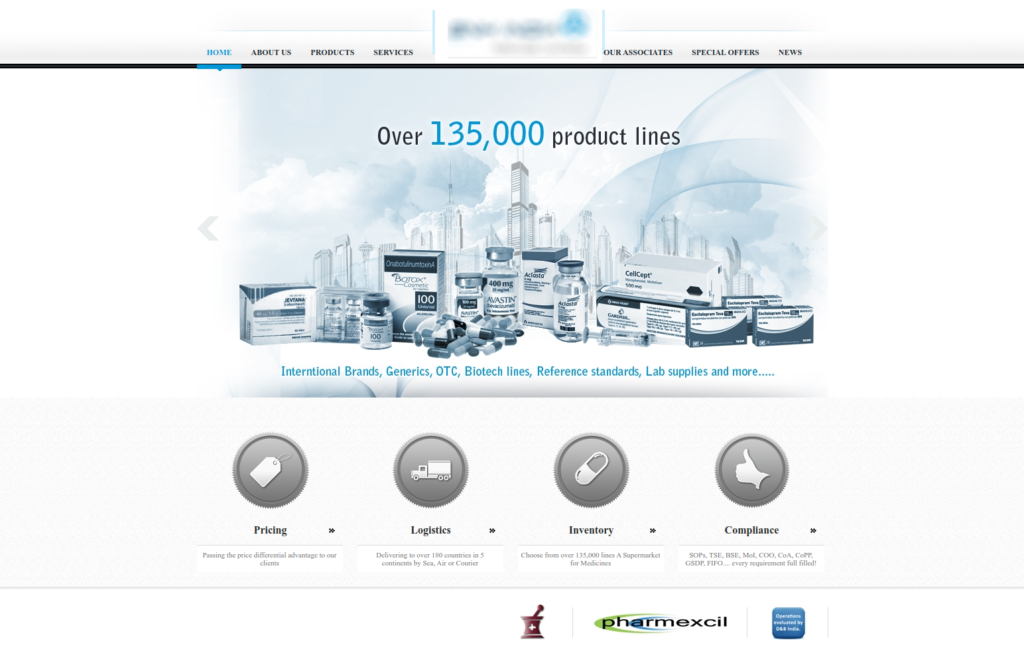
Screenshot 1: Old website of one of our clients.
At first glance at the website, we knew- The design looks dated, the photos are low quality, and the overall aesthetic is unappealing.
- The business has outgrown. It has evolved over the years, but the website doesn’t go hand in hand with this change.
- Over the years, the site has accumulated design and content inconsistencies, giving users a bad experience.
- The website didn’t incorporate the changes in the business's marketing strategy, which had changed over the period.
- Visitors were not as interested in the website as they were initially.
Your team tells you
Another sign to watch for is that your team constantly tells you, specifically the marketing and sales team, that the website needs to be upgraded. Here, business owners tend to ignore such requests since they think it's not a pressing need.Your existing website developer reminds you
Another important sign to look for is when your existing website vendor reminds you that the website is aging and needs a revamp. We ourselves tell our customers that their website has not been redeveloped for more than two years and needs serious attention. Since we know the market's trends inside out, we warn our clients that websites need to be upgraded even before they become stagnant and outdated.Conclusion
We discussed the top signs that you need to look for when determining whether your website needs a makeover or not. The next step is to head over to your website, go through these signs, and check if you feel that the website is stagnated, outdated, and needs an overhaul. Also, discuss this with all the stakeholders, specifically with your marketing and sales team. If you need expert advice on this, feel free to talk with our website experts.
General
5 min read
How to reduce Cumulative Layout Shift
Major causes of Layout Shifts
CLS mainly occurs due to the change in the DOM element’s position or dimensions. The most common causes for CLS are,- Images without width and height attributes
- Ads, iframes, and embeds with no reserved space
- Web Fonts causing FOIT or FOUT
- Dynamically inserted elements above the existing elements
Images without width and height attributes
The problem
Consider the below situation. An image without width and height specified is requested from the server. [video width="800" webm="https://www.wpoets.com/wp-content/uploads/2021/08/cumulative-layout-shift-by-image.webm"]A screencast showing Image loaded without width and height causing layout shift
Before downloading the image the browser doesn’t know the amount of space that it should allocate. Once the image is loaded, the browser allocates the required space thus shifting the elements below it. This causes layout jank.The solution
Following is the solution for responsive images with minimum layout shift.<style>
img {
width: 100%; height: auto;
}
</style>
<img
width=”800”
height=”800”
src=”demo-image-800.jpg”
srcset=”demo-image-480.jpg 480w,
demo-image-800.jpg 800w”
sizes=”(max-width: 600px) 480px, 100%”
alt=”This is Demo Image” />Ads, iframes, and embeds with no reserved space
The problem
As with the images, advertisements can contribute to a high CLS score. Advertisements in most cases load asynchronously. If sufficient space is not reserved beforehand they can cause CLS. [video width="600" webm="https://www.wpoets.com/wp-content/uploads/2021/08/cumulative-layout-shift-by-advertisement.webm"][/video]A screencast showing Image loaded without width and height causing layout shift
Before downloading the image the browser doesn’t know the amount of space that it should allocate. Once the image is loaded, the browser allocates the required space thus shifting the elements below it. This causes layout jank.The solution
Following is the solution for responsive images with minimum layout shift.<style>
img {
width: 100%;
height: auto;
}
</style>
<img
width=”800”
height=”800”
src=”demo-image-800.jpg”
srcset=”demo-image-480.jpg 480w,
demo-image-800.jpg 800w”
sizes=”(max-width: 600px) 480px, 100%”
alt=”This is Demo Image”
/>
Ads, iframes, and embeds with no reserved space
The problem
As with the images, advertisements can contribute to a high CLS score. Advertisements in most cases load asynchronously. If sufficient space is not reserved beforehand they can cause CLS. [video width="600" webm="https://www.wpoets.com/wp-content/uploads/2021/08/cumulative-layout-shift-by-advertisement.webm"][/video]A screencast showing advertisements causing layout shift
For optimal performance publishers often support dynamic ad sizes like fluid & multi-size ad slots which gives better CTR. These ads may expand or collapse, depending on the settings, thus triggering layout shift.The solution
To fix CLS issues created by ads, reserve space statically beforehand. Although, due to the variety of ad sizes available, a one-size-fits-all space allocation is difficult. Instead, make adjustments to size allocation until its layout shifts free. The size to be allocated can be determined by historical data reports from the publisher. For e.g, there are two ads of sizes 300x240 & 320x60 which are delivered. Allocating a height of 240 px can avoid layout shift. The bare minimum code for a multi-size ad slot could be,<div
id="publisher-ad-slot"
style="min-width: 300px; min-height: 250px;">
</div>
Dynamically inserting elements above the existing elements
The problem
As with images and ads, dynamic content is also responsible for CLS. The new content is dynamically added on top of the existing content. Following are some examples of dynamically injected content,- Newsletter signups
- Register for a webinar or conference
- Campaigns and special offers
- Install mobile apps
- Download whitepaper or ebook
Custom web fonts causing FOUT or FOIT
The problem
Another common cause of Cumulative Layout Shift is custom fonts. As compared to the other causes, custom fonts have a smaller impact but still, the layout shift is visible. Custom fonts have to be downloaded and rendered. Till the fonts are loaded two problems can occur depending on the font-display CSS property set. FOUT (Flash of Unstyled Text) occurs when the custom font is downloaded and is swapped with the fallback font. Until the font is being downloaded the fallback font is displayed. [video width="600" webm="https://www.wpoets.com/wp-content/uploads/2021/08/cumulative-layout-shift-by-fout.webm"][/video]A screencast showing Flash of Unstyled Text (FOUT)
FOIT (Flash of Invisible Text) is when the browser doesn’t display any font, not even fallback font. It shows invisible text till the custom fonts are loaded. [video width="600" webm="https://www.wpoets.com/wp-content/uploads/2021/08/cumulative-layout-shift-by-foit.webm"][/video]A screencast showing Flash of Invisible Text (FOIT)
In both cases any font that renders smaller or larger than its fallback causes layout shift.The solution
As of now to avoid CLS caused by fonts, there is only one solution. The idea is to use <link rel="preload"> along with CSS property font-display: optional. This will load fonts without layout jank when rendering custom fonts. Here is the code, <link
rel="preload"
href="/assets/Pacifico-Bold.woff2"
crossorigin as="font"
type="font/woff2" >Closing thoughts
Minimizing CLS score should be on high priority for website owners since layout shift leads to a poor user experience. The common solution to fix Layout shifts is to reserve space. Reaching a CLS score of 0 should be an ideal target. Here is a screenshot of Gtmetrix for a web page that we optimized for a CLS score of 0.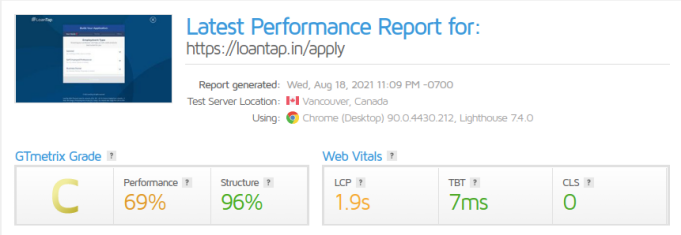
A web page optimized for CLS score of 0
CLS metric is the first step to make websites more visually stable. It’s evolving and in the coming years, based on data analysis it would tell us more about its impact on User Experience.
General
4 min read
Introduction to the Core Web Vitals
Introduction
Google is in the process of updating its search algorithm called “Page Experience Update” which introduces Core Web Vitals (CWV) as the new ranking factor. This update has started rolling out globally in June 2021 and is expected to complete by the end of August 2021. Core Web Vitals (CWV) will help in ranking web pages (along with hundreds of other ranking factors) that load fast, quick to respond to the user interactions, and are visually stable, thus giving the best possible experience for the visitors.The Basics of Core Web vitals
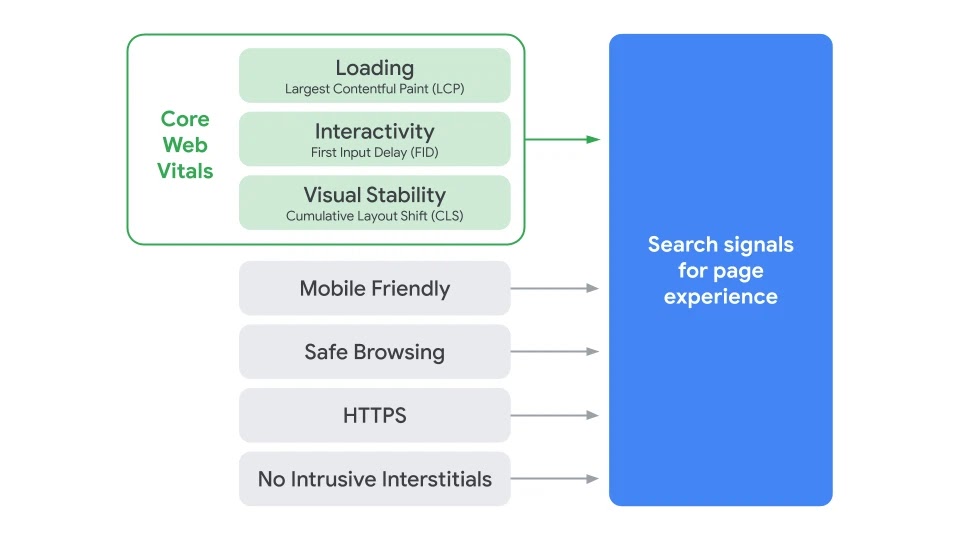
Search Signals for Page Experience Source: Google Search Central
As seen in the above image the “page experience signals” combine Core Web Vitals with Non-core Web Vitals. This blog focuses only on the Core Web Vitals.1) Largest Contentful Paint (LCP)
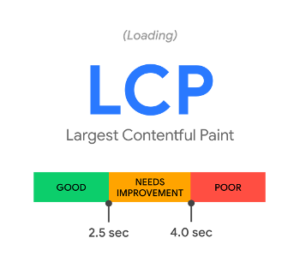
CWV metric 1: Largest Contentful Paint (LCP) Source: web.dev/vitals
The first metric in the CWV is the Largest Contentful Paint (LCP) which measures the loading performance of a web page. A web page consists of many elements such as text, images, videos, among others. The browser takes some time to render these elements. The time it takes for the web page’s largest element painted within the viewport (above the fold) is LCP. Let’s say there is a webpage where above-the-fold content consisting of five paragraphs and two images. The size of the first image is 100KB and that of the second image is 200KB. [aw2.module slug='pullquote' pull_class='float-left'] [aw2.this html] According to Google, a good LCP score is 2.5 seconds or less for the 75th percentile of the page loads segmented across mobile and desktop devices [/aw2.this] [/aw2.module] If we assume that the text size is less than the image size, the image of the size 200KB will be considered the largest element in the viewport and will be shown in the LCP. As of now only text and image blocks visible in the viewport are considered in the LCP metric. In the case of videos, the poster image is considered. The elements contributing to LCP could be different for mobile and desktop views. For mobile view, it could be a text element, but it could be an image for desktop, depending on the layout rendered in the viewport. There would be at least one LCP element on the web page by default.2) First Input Delay (FID)
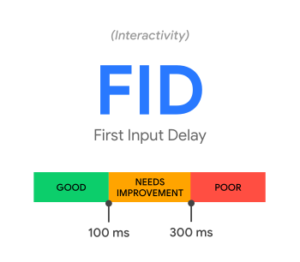
CWV metric 2: First Input Delay (FID) Source: web.dev/vitals
[aw2.module slug='pullquote' pull_class='float-right'] [aw2.this html] According to Google, a good FID score is 100 milliseconds or less for the 95th–99th percentile of the page loads segmented across mobile and desktop devices [/aw2.this] [/aw2.module] The second metric in the CWV is First Input Delay (FID) which measures the interactivity & responsiveness of a web page. Input delay (first one only) is when a user tries to perform some action like clicking a link or tapping a button or typing, but the browser's main-thread is busy doing other important tasks, thus it’s unable to respond to the user’s interaction. The browser’s main thread is responsible for various tasks such as loading the resources, parsing HTML & CSS, building the DOM, executing javascript, along with other important tasks.3) Cumulative Layout Shift (CLS)
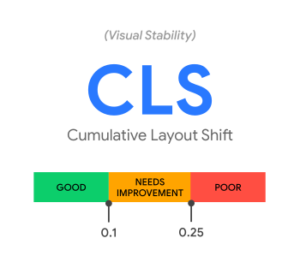
CWV metric 2: Cumulative Layout Shift (CLS) Source: web.dev/vitals
The third metric in the CWV is Cumulative Layout Shift (CLS) which measures visual stability. [aw2.module slug='pullquote' pull_class='float-left'] [aw2.this html] According to Google, a good CLS score is 0.1 or less for the 75th percentile of the page loads segmented across mobile and desktop devices. [/aw2.this] [/aw2.module] Visual stability is achieved when there are fewer or no unexpected layout shifts in the viewport. An example of an unexpected layout shift is when a user is viewing a piece of content and is about to click a menu, but suddenly due to an advertisement, the page layout changes and the user clicks the ad instead of the menu. This layout shift is annoying and causes a poor user experience. The most common causes for CLS are, images without width and height, dynamically inserted content above the existing content or ads, and iframes without dimensions.Conclusion
Google’s Page Experience Update is important (as for every minor or major update) for all stakeholders, from developers to marketers to business owners. This new update will change how the web pages are developed and tested. Before making any new web pages live, it’s now necessary to check the Core Web Vitals in the lab environment. Once the webpages are live they have to be continuously monitored with field data collected from real users and based on the data improve the page experience. We have already included Core Web Vitals in our continuous improvements program. This update is important for us, as we are always looking for ways to continuously improve our clients’ websites.
General
1 min read
(Secret) Santa came to WPoets

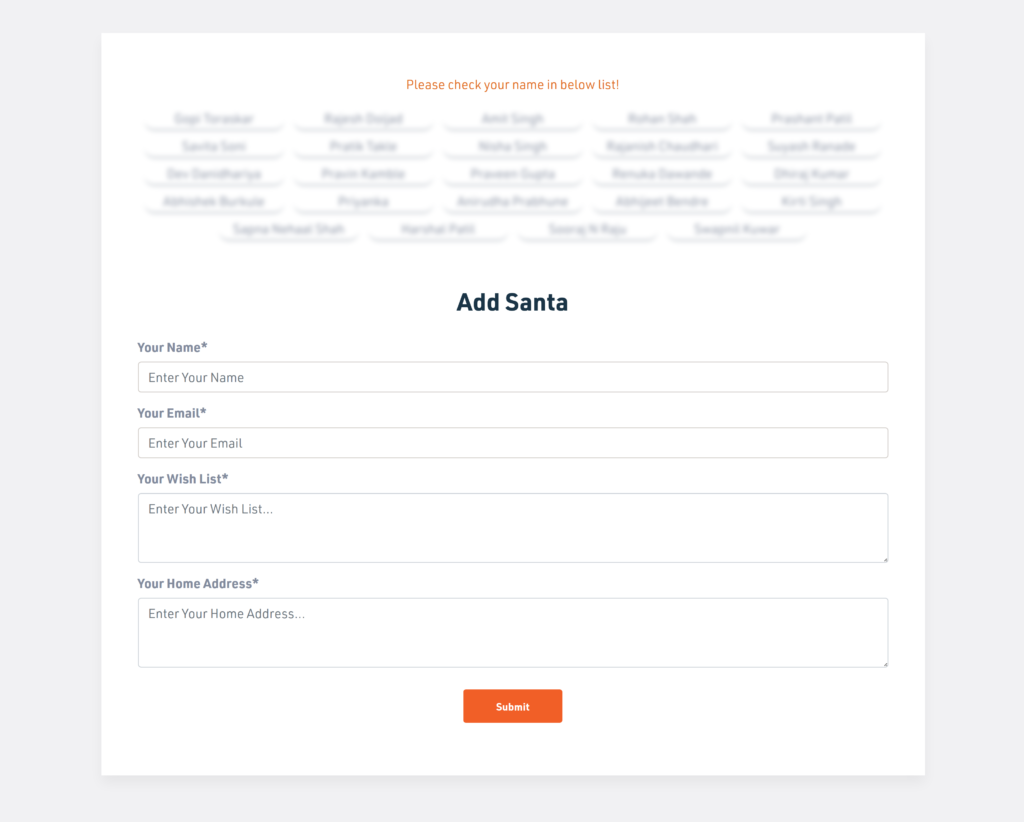
Team Members added themselves as Secret Santa
Team Members added themselves as Secret Santa. Also, they added their wish list along with their address. For drawing the names each member clicks once on a gift box, which is shown randomly. The chosen name and their wish list are emailed to the logged-in user.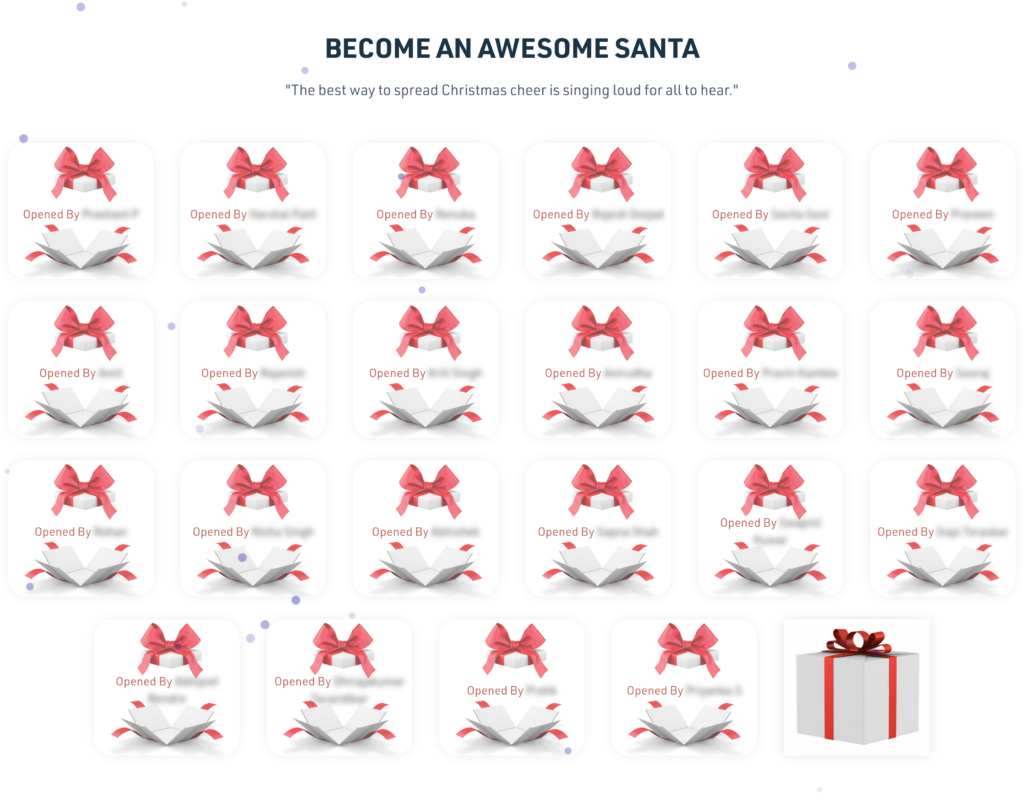
Selecting a name to Gift
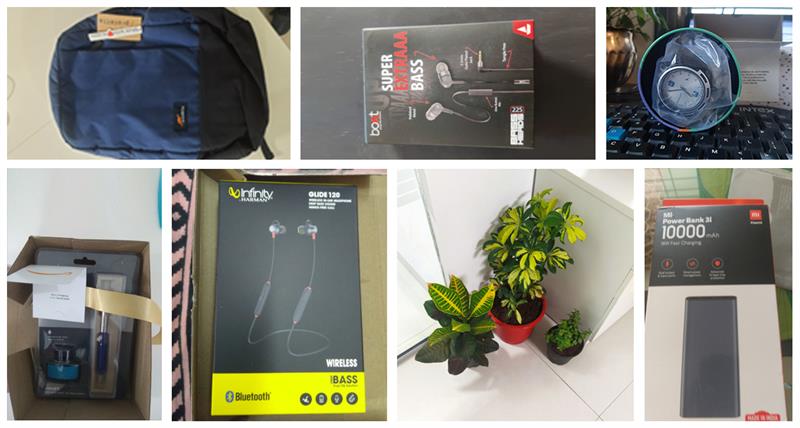
Gifts by Secret Santa
Workplace Christmas celebrations allow us to spend quality time together as a team. Merry Christmas and Happy New Year. Signing off for now. See you next year.
EdTech
8 min read
Top online Platforms that Educational Institutions should use to engage their students amid the Coronavirus lockdown
Introduction
The world is hit by a pandemic caused by coronavirus due to which all the educational institutions such as Schools, Colleges, Universities, Private institutions, have to abruptly & temporarily shut down to prevent the rapid spread of the virus. This is unprecedented where millions of students right from primary schools to colleges are forced to switch to e-learning tools to ensure their educational continuity. Educators are now under extreme pressure to complete the remaining activities such as assignment submission, oral viva’s, practical examinations, summative exams, among others for the current academic year. They are also worried about how things are going to move forward in the next academic year when the entire existing system has collapsed. Many educational institutions have completely stopped their teaching activities, while some institutions are carrying out activities through online tools, emails, and WhatsApp. But the remaining major part has not yet fully adopted or doesn't use online tools at all. The purpose of these tools is to virtually create an environment similar to their classroom so that the students can feel that they are in their classrooms from the comfort of their home. The classroom teaching has few activities- Attendance of students
- Teaching and Learning
- Notes sharing (Presentation / Printed materials / Dictation)
- Assessments (Objective or Subjective, Formative or Summative)
Google Classroom
Google Classroom is built with a purpose to manage teaching and learning online. It helps teachers to create and organize classes, subjects, assignments. Students are enrolled in these classes, are assigned classwork in the form of assignments & quizzes, and have access to shared educational materials. Teachers can post class announcements to all the students or only to selected students. They can track the quizzes and assignments given to students. A detailed progress report, along with the grades of the students, is available all in one place. As expected, the Google Classroom seamlessly integrates with other Google tools such as Google Docs, Google Drive, Google Forms, among others. It's not a full-fledged LMS (as compared to other LMS discussed later in this post), but teachers can quickly configure it and start using it right away. Also, it can scale to any number of teachers and students, thanks to Google's infrastructure. One of the best features of the Google classroom is where Teachers can invite Parents to share summaries of the student’s work. This encourages the parent’s participation in the academic context as they have detailed access to the student’s progress right from the beginning.Your Educational Institution can use the Google Classroom in the following ways
- Teachers can quickly create classes and invite their students to join them.
- A single dashboard to manage all the classes.
- Distribute teaching materials & assignments.
- Easy communication between teachers and students.
- Allows students to take assignments and quizzes.
- It allows teachers to upload educational materials where the students can view them.
| Official Website | https://edu.google.com/products/classroom/ |
| Teacher Center | https://teachercenter.withgoogle.com/first-day-trainings/welcome-to-classroom |
| Help Center | https://support.google.com/edu/classroom/#topic=6020277 |
| Teachers Essential Guide | https://www.commonsense.org/education/articles/teachers-essential-guide-to-google-classroom |
Moodle
Moodle is one of the most flexible tools used by educators for blended learning (mix of both classroom and online teaching and learning), e-learning, distance education, flipped classroom. It’s a powerful learner-centric software that is highly flexible and scalable, which extends both teaching and learning beyond traditional methods, making it accessible for learners any time, anywhere. It’s used by nonprofit, government, businesses of all shapes and sizes, among others, to meet their wide array of learning needs.Your Educational Institution can use the Moodle in the following ways
- Engage students with both online and offline teaching and learning.
- Classes can be instructor-led, self-paced, blended, or entirely online.
- Create courses, share teaching resources to students in the form of PDF, Word, Audio, Video, among others.
- Conduct online exams using quizzes that use pre-built question templates of MCQs, Match the Columns, fill in the blanks, etc.
- Create and share assignments, collect submissions from students digitally (Online text or File submissions). Grade or give feedback on the assignments.
- Moodle has an inbuilt full-fledged file management system, which makes it easy for teachers to upload their teaching materials such as Word Files, Presentations, PDFs. Documents can even be directly imported from various cloud storage services such as OneDrive, Google Drive, Dropbox, among others.
- Teachers can track the progress of each student such as Activity completion & Course completion. All online and offline learning activities can be recorded.
- A calendar to keep track of the various academic activities such as course completion dates, assignment due dates, upcoming quizzes, among others.
| Official Website | https://moodle.com/ |
| Documentation | https://docs.moodle.org/38/en/Main_page |
| Teacher quick guide | https://docs.moodle.org/38/en/Teacher_quick_guide |
| Learn Moodle | https://learn.moodle.org/ |
Zoom
Zoom is a video conferencing service that allows people to meet virtually via audio and video. It is a highly scalable service with real-time messaging and screen sharing, mimicking the classroom environment, perfectly fit for teachers. Video conferencing makes it easier to engage students than any other means. It is a go-to option for teachers to host live classes. It has a simple, intuitive interface with lots of useful options that makes it possible to conduct live classes for even hundreds of students simultaneously. Educational institutions use Zoom for conducting their classes, internal faculties, or administrative meetings; conduct placement drives virtually, among others. This tool makes it possible to extend both teaching and learning beyond traditional classrooms. Students can virtually join classes conducted by their teachers, from the comfort of their home or view recorded sessions later to learn at their own pace.Your Educational Institution can use the Zoom in the following ways,
- Teachers can conduct their classes live or record and share them
- Internal faculties meetings or administrative meetings
- Student Viva’s
- Conduct placement drives virtually, Schedule online interviews.
| Official WebPage | https://zoom.us/ |
| Zoom Training Resources | https://zoom.us/docs/en-us/covid19.html |
Smriti EdTech
Smriti is an EdTech platform we built ground up by working closely with private Schools, Institutes & top NAAC rated colleges. This platform has been constantly improved upon through the feedback from various stakeholders of educational institutions such as top-level management, teaching & administration staff, students & alumni. Although we have discussed Google classroom and Moodle in this blog, we strongly recommend a tailormade solution like Smriti EdTech, which is designed from scratch for Educational Institutions like yours. Note that this platform is not a turn-key solution, which can be installed quickly and be used from day one. Instead, it’s a custom-tailored solution that solves specific challenges that a particular institution may have. It is not another generic ed-tech solution that is out there in the market. We believe that every institution is unique and has its own set of challenges, and this platform is built to solve those challenges. Currently, this platform consists of 20+ integrated modules(Click here to see a detailed list of modules), which are custom developed to solve various challenges that educational institutions face.Your Educational Institution can use the Smriti EdTech platform in the following ways,
- Teaching and learning
- Conduct Online Objective and Subjective Exams
- Track progress of students
- The amount of content that has been consumed by the individual student.
- The number of attempted or completed quizzes.
- Detailed tracking of the given assignments.
- Analytics of the Videos (recorded lessons) such as no. of views, the percentage of video viewed.
- Detailed tracking of the given tasks.
- Master Calendar