Inside a 1:1 replatform from Kirby to WordPress for a Swiss-listed global manufacturer
About the Client/Project
- Location
- Switzerland
- Project Duration
- 8-10 Weeks
- Industry
- Manufacturing
- Team Size
- 8
- Work Type
- Development, DevOps, Migration
A Swiss-listed industrial manufacturer enabling innovation globally
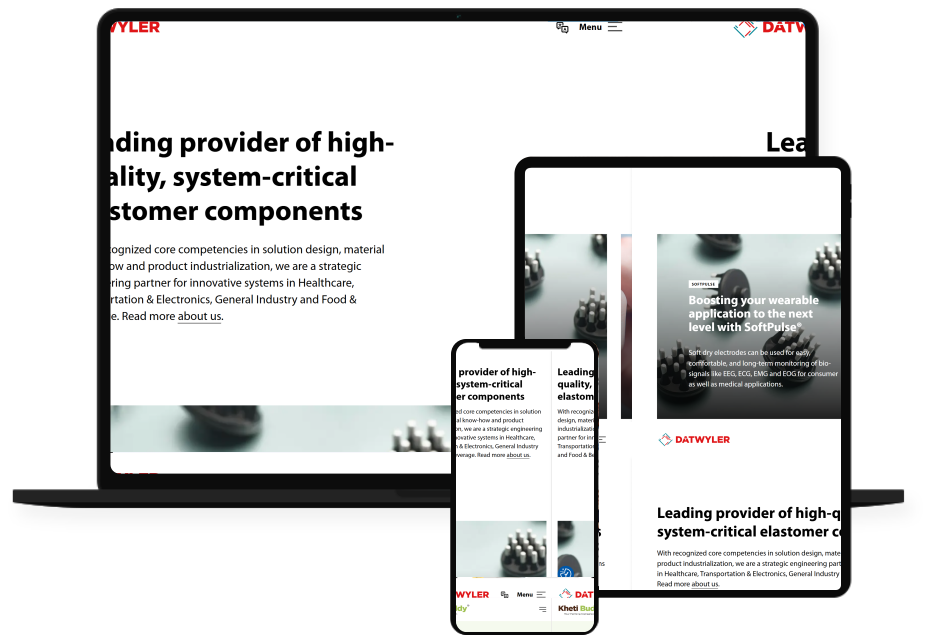
The client is a publicly traded Swiss industrial manufacturer with annual revenues exceeding CHF 1 billion and operations spanning multiple continents.
The organization operates a highly distributed global business that requires a scalable, multilingual enterprise website to support its international operations and diverse business units.
The website sits at the heart of the company’s global digital strategy, acting as the main hub where they showcase solutions & capabilities to the world across a variety of industries & business units.
As a publicly traded organization, the company publishes all necessary investor communications and regulatory disclosures on its website, along with news, events, publications, downloads, and other information in multiple languages for a global audience.
Problem Statement and Solution
Problem Statement
When this client approached us, they were running their corporate website on Kirby, a flat-file content management system. For smaller projects and technically oriented teams, Kirby can be an excellent fit.
However, as the website grew, the limitations of a file-based, developer-centric workflow became increasingly apparent to marketing and editorial teams.
That’s exactly where the client had outgrown their platform.
A mixed-version legacy platform
During discovery, we found content split across two generations of the platform: a portion of the site still running on Kirby 2, with newer sections built on Kirby 3.
Running Kirby 2 well past its EOL date, January 1, 2021, and Kirby 3 past its EOL date, December 1, 2025, meant the website had been carrying unaddressed vulnerability risk for years, which raised the urgency of the migration beyond just “modernization.”
Narrow Window for Migration
The client operates on a financial reporting cycle in which the corporate site must be untouched from December through February. That left us with a narrow window: ideally before or by November.
Once we’re inside the December-to-February reporting period, nothing on the corporate site can change: no redesigns, no CMS swaps, and no risk introduced during a period when the site needs to be stable and audit-safe.
If we missed the November cutoff, the only option was to push the entire migration past March, which wasn’t acceptable from a roadmap or stakeholder-expectation standpoint.
The requirement was a 1:1 migration: same design, same content, no scope creep, executed on a tight and non-negotiable timeline.
Solution
The team responsible for the website was based in Altdorf and had historically maintained the website in-house. Going forward, that responsibility now shifts to a shared model between the Altdorf and Pune teams.
This is where the need for an outside partner emerged.
Also, they wanted to consolidate everything onto a single, more widely adopted technology stack: WordPress.
With that decision made, they began searching for a WordPress enterprise agency with proven migration expertise and a presence in Pune, where their engagement with us began.
The new WordPress build was scoped for 25–30 unique page templates, supporting an initial launch footprint of 1,400+ total pages, with the expectation of ongoing content additions post-launch.
The site is fully multilingual, with content management needs across three languages:
- English: 600+ content items
- German: 300+ content items
- Chinese: 150+ content items
The multilingual setup was configured using the Polylang WordPress plugin. We ensured that the language relationships, taxonomies, and locale-specific URLs carried over cleanly from the Kirby structure rather than being rebuilt from scratch for each language.
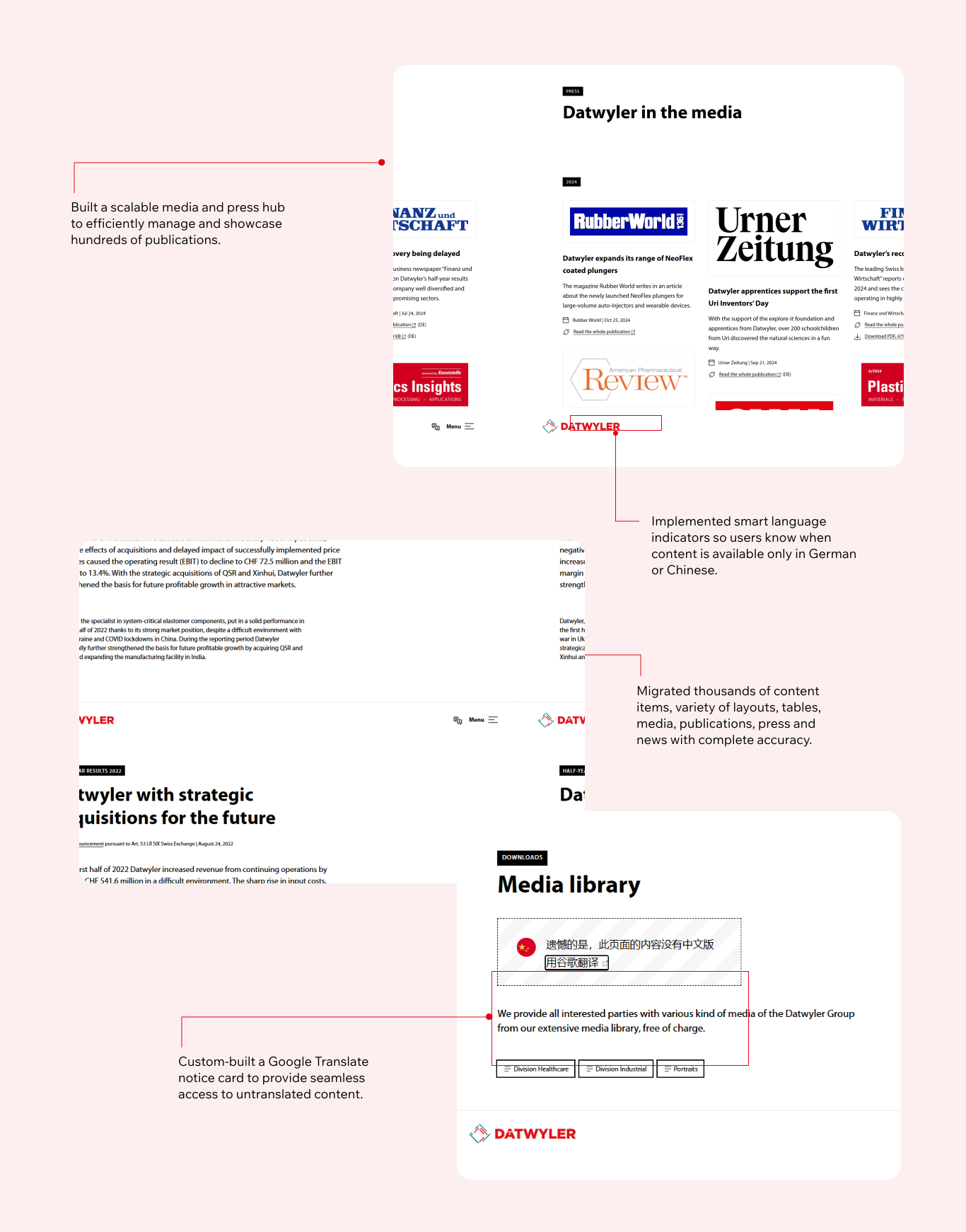
Also, when related German or Chinese content is unavailable, a relevant notice is displayed with a link to Google Translate.
The new platform was designed in such a way as to support the following:
- Multilingual content management using Polylang
- Custom Post Types for News, Events, Publications, Press Releases, Downloads, and Locations
- A centralized media library containing 3500+ assets and supporting documents
- Ongoing campaign creation and content publishing by internal marketing teams
The approach we took
1:1 Replatforming from Kirby to WordPress
WPoet’s primary responsibility was to deliver a seamless 1:1 migration of the existing website from Kirby CMS to WordPress. While the overall structure, design, and content were carried over, the entire platform was rebuilt natively on WordPress, including all page templates, reusable components, and underlying functionality.
The project involved recreating a complex, multi-level information architecture, implementing multilingual capabilities, and integrating business-critical systems, including forms, newsletter subscriptions, and HR platforms. We provided a flexible and scalable content management backend to support ongoing content publishing.
We also set up Google Analytics 4 (GA4), preserved on-page SEO, optimized for Core Web Vitals and performance, applied security best practices, and conducted extensive quality assurance testing to ensure a smooth and successful launch.
The Approach
Hybrid Migration Process
With a massive content footprint of over 1,400 pages, close to 4,000 media assets, and content spanning two versions of Kirby and three languages, we used a hybrid approach to migrate the entire website within the tight reporting deadline.
This helped achieve the required 1:1 parity between the old Kirby platform and the new WordPress platform.
The client gave us a complete export of the existing website, including all content files, media assets, and supporting resources from both the Kirby 2 and Kirby 3 environments.
To make the migration as smooth as possible and reduce manual work, the WPoets team created custom migration scripts that could read the Kirby content structure and import it into WordPress while preserving content relationships and metadata.
The automated bit handled:
- Content migration for all content types. Page content, hierarchies, and metadata all got carried over correctly into their corresponding WordPress custom post types and templates.
- Preserving SEO metadata. We were able to map and keep existing URLs, meta titles, meta descriptions, etc.
- Internal linking structures>
- Content hierarchies and relationships
- Layout and component mapping
- Multilingual content associations
- Media references and attachments
Since we already had the required Gutenberg block library built and ready, the migration scripts could automatically transform Kirby content into the corresponding WordPress block structures during import.
With all the Gutenberg blocks already built and in place before we started the migration, the script simply dropped the content straight into the correct block structures, so when the migrated pages landed in WordPress, they were already perfectly set up.
In the end, more than 80% of the website content was moved over using automation.
The 20% that needed a bit of human touch involved highly customized page layouts, content structures, and edge cases that didn’t map cleanly to the pre-made Gutenberg components or migration rules.
The migration also involved moving over close to 4,000 media assets, such as PDFs, videos, audio files, images, and downloadable resources. All the assets got uploaded to the WordPress media library and automatically linked to their corresponding content items.
For multilingual content, the migration scripts detected language variations by examining the existing file and folder naming conventions in the Kirby repository. This meant translated pages and supporting assets, including language-specific PDFs and downloads, got linked to their respective language versions in WordPress.
Once the initial migration was completed and validated in the staging environment, the WPoets team performed a delta migration to capture any newly published or modified content created on the live Kirby website during the development phase, ensuring the content was good and in parity at the time of launch.
Multilingual website in English, German, and Chinese
The website served as a multilingual corporate platform supporting content in English, German, and Chinese across multiple regions and business units.
To make it easy for visitors to navigate, we used the Polylang WordPress plugin to translate content and set up relationships between languages and localized workflows.
There were a few things to consider when managing content in multiple languages. Not all English pages had a German or Chinese version, and the same was true the other way around.
To handle these scenarios gracefully, language fallback was implemented. If a user tried to access content that didn’t have a translation, they’d get a nice little notice saying the content wasn’t available in their chosen language, along with a link to access machine-translated versions using Google Translate.
We tweaked a bunch of Polylang settings and URL behaviors to make sure everything lined up with the client’s global content goals:
- Directory-based URLs to figure out what language a page belonged to.
- English: /en/my-post/
- German : /de/my-post/
- And in Chinese: /cn/my-post/
- When media is uploaded to the WordPress media library, it gets duplicated and associated across all languages, which makes content management heaps easier
- Language fallback that displays the first available translation if the content isn’t in the user’s chosen language
- Tweaked the language switcher so it keeps users on the same page even when translations are missing, which helps keep the experience smooth and uninterrupted
This meant the client could reach a global audience while still giving their editorial team the flexibility to roll out translations over time without breaking user experience or search engine rankings.
The Polylang plugin also added hreflang tags, which help search engines understand relationships between language and regional variations of a page, which in turn means the following:
- Users see the best match for their language in search results.
- Reduces the chance of duplicate content appearing across translated pages.
- Improves international search engine performance and visibility in local markets.
- Gives users the best experience by serving content in their preferred language.
Preserving Design Continuity
One of the challenges the project faced was preserving the existing user experience in place while giving the editorial and marketing teams a massive boost in content management capabilities.
The legacy Kirby platform had over a thousand modules in use, spread across static and dynamic content, as well as structural use cases.
Over time, many of these modules had similar layouts, overlapping functionality, and inconsistent naming conventions. This often created confusion about which module to use for a particular layout or content requirement.
Most of the time, modules were created simply to avoid breaking existing ones and unintentionally affecting pages already in production. As a result, the platform accumulated numerous variations of visually similar modules with only minor differences in behavior or configuration.
As part of the replatforming, WPoets conducted a detailed audit and identified common sections and their patterns to consolidate overlapping functionality.
The outcome was a library of over 100 custom Gutenberg blocks and all sorts of variations, all available to the client to support their current and future content needs, and all aimed at reducing complexity.
These covered just about every use case, including the following:
- Hero sections
- Content layouts and grids
- Places and directories
- News listings and events
- Download sections and resources
- Call-to-Action sections
- FAQs and Q&As
- Post sliders and related content
- Media galleries and all sorts of media-rich components
Rather than building page-specific templates, the new component architecture lets editorial teams build pages using reusable drag-and-drop blocks that maintain the brand’s look and feel.
This transition provided several benefits:
- Pages are assembled, not requested. Editors can just drag, drop, and reorder blocks and even configure them without needing a developer. What used to take days now takes a few hours.
- Consistency without being too rigid. Because the design is built into the block, editors can still make pages that are different from each other without going off-brand.
- Blocks can be reused in different contexts. A single block (like a CTA) can be configured to suit different needs, such as a product page or a campaign landing page, without duplicating code or creating a new version.
- Building new pages is a whole lot faster now. With the full library of blocks in the editor, marketing teams can build, preview, and publish content at scale.
The migration completely changed the content authoring experience from linear to a modern, visual, and highly flexible editing environment powered by WordPress and Gutenberg.
Marketing teams could now create super-rich, structured pages using drag-and-drop components, all while keeping the brand’s look and feel intact.
WordPress Retainers: Ongoing Support and Continuous Improvements
The engagement was beyond the initial migration and go-live. The client needed the platform to evolve alongside their business. WPoets provided a monthly WordPress retainer that included a set number of monthly support, development, and DevOps hours.
All without the headache of having to hire, manage, train, retain, and coordinate a team of specialist resources internally.
Here is what the retainer actually covers:
Scope-free development hours
Most retainer agreements are pretty standard: uptime monitoring, content updates, and the occasional bug fix. But not ours; ours is a bit more flexible.
Alongside the standard maintenance, the retainer includes scope-free development hours that the client can use towards whatever they need to do on the website, without having to worry about negotiating a fresh scope or getting budget approval.
Want a new feature? Use the hours. Need a design refresh? Same story. Got a landing page for an upcoming campaign? No problem.
Support Hours
The client needed ongoing support; we are just an email or phone call away.
We also hold a biweekly catch-up call with the client’s team to review what’s been done, outline what’s coming up next, and keep everyone aligned on the overall plan.
That way, the stakeholders can review what’s happened so far, rebalance priorities if needed, and give us feedback on the stuff we’re doing.
DevOps Hours
We make sure to update WordPress and any add-on plugins after we’ve validated them in our staging environment and thoroughly tested any parts of the website that are affected by the changes.
In addition, we wait for the wider WordPress community to spot any issues with the latest plugin releases before we push them live.
We also make sure to perform regular backups to offsite storage (such as S3 buckets) that are separate from the rest of the website infrastructure. And then we go and check that the backups actually work.
We also manage staging, UAT, and production environments in collaboration with the client’s IT and QA teams, building in deployment checks and rollback readiness into every release cycle.
Content and Publishing
We also perform routine updates like content changes, image updates, uploading PDFs & assigning them to relevant pages, and any stakeholder requests; all are handled within an agreed-upon time frame.
We also upload and format a wide range of new resources, such as blogs, reports, news events, and campaigns, for the client.
And on top of all that, we make sure we’re implementing on-page SEO best practices for all new and updated content.
Analytics and Reporting
Every month, the client gets a detailed report with:
- All the tasks we’ve done
- Any issues we’ve sorted out
- The website’s uptime statistics
- Confirmation of the backups
- Usage of development hours
- Our recommendations for things they might be able to do to improve the website
We also proactively monitor Google Search Console and resolve any issues or warnings before they affect search visibility or performance.
So there’s no room for assumption; the health of the website is something we track and document.
Performance and Security
We keep a close eye on how the website is performing, including metrics like Core Web Vitals, server uptime, and overall platform health.
Security-wise, we do things like:
- Scanning for malware
- Spotting any injected spam
- Keeping an eye out for website defacement or internal server errors
- Spotting and fixing any security vulnerabilities
Retainer Plan at Just a Fraction of the Cost of Hiring an Entire Team
The retainer plan that we shared with the client was nice and simple: for the cost of one internal resource, they get access to a whole team of experts:
- A top-notch Developer to take care of all the techy stuff
- A creative Designer for continuous design enhancements.
- A DevOps engineer who’s there to keep the site secure, backed up, and running like clockwork
- A Webmaster to keep the content up-to-date with SEO spot on
- And a Project Coordinator is the go-to person for everything; no more juggling multiple contacts or directly coordinating with internal team members
For the client, it made their life easier when they had somewhere to go for every website need, new features, design changes, content updates, and technical fixes, without having to re-engage, re-scope, or re-budget every time.
Team Size and Composition
Technical Coordinator
1
Developers
2
Project Manager
1
Webmaster
1
DevOps
1
Business
2
Features / UI Highlights
Result and Metrics
Quantitative
- 25–30 unique templates recreated and optimized on WordPress.
- 1,000+ content pieces and 3,700+ media assets successfully migrated.
- 100+ reusable Gutenberg blocks were developed to accelerate content creation, reducing dependence on developers.
- Multilingual platform supporting three languages:
- 600+ English content items
- 300+ German content items
- 170+ Chinese content items
Qualitative
- Successful 1:1 replatforming from Kirby to WordPress with complete preservation of the user experience.
- The transition to WordPress was seamless, with no disruptions to day-to-day business operations.\
- Zero downtime during go-live, ensuring uninterrupted access for users.
- The website structure, design, and functionality all stayed the same, just a better, more modern WordPress underneath.
- No impact on ongoing marketing, lead generation, or customer engagement activities.
WPoets delivered the project on time, providing active communication on the progress of the work. The team managed the project well and communicated effectively through virtual meetings and emails. Moreover, WPoets' responsiveness and transparency were key elements of their performance.