


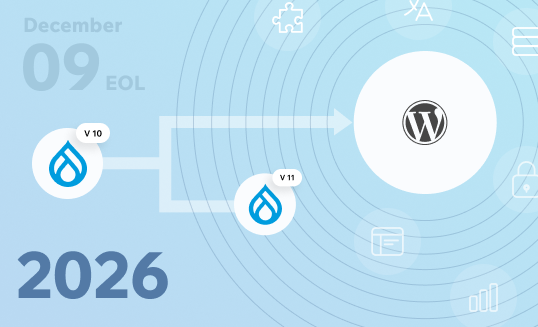

December 9, 2026, marks the official end-of-life date for Drupal 10. After that date, Drupal core stops receiving security patches, bug fixes, and official support. If your enterprise runs a Drupal website on version 10, you have roughly five months to act before your site will no longer receive official support.
Drupal 10 End of Life: What’s Happening after December 9, 2026?
After December 9, 2026, Drupal 10 will no longer receive security support. Here is what that means for site owners and enterprise teams in practical terms:
- Security vulnerabilities go unpatched: Any newly discovered exploits in Drupal core or contributed modules will not receive fixes. Your Drupal site becomes an increasingly attractive target, and security risks compound every month you remain on an outdated version.
- Infrastructure compatibility breaks: As PHP versions, Symfony components, and hosting environments continue to evolve, the technologies Drupal 10 depends on will eventually reach the end of their support lifecycle. Over time, this can lead to compatibility issues with your server environment, third-party integrations, and future updates.
- Maintenance costs spike: When official security updates are no longer available, your team has two choices: identify and patch vulnerabilities yourself or live with the security risks. In most cases, both options are more expensive than staying on a supported platform.
- Compliance pressure increases: Regulated industries (finance, healthcare, education) may not pass audits when running an outdated platform that no longer receives security patches.
At WPoets, we are a WordPress-first agency, but we approach this decision honestly. We also support structured, low-risk migrations from Drupal, including Drupal 7, Drupal 8, Drupal 9, and Drupal 10. sites. Our goal is to help you choose the path that genuinely fits your organization, not selling a platform for its own sake.
Understanding Drupal’s Release Cycle and Drupal 10 End of Life
Drupal ships a new major version roughly every two years. Drupal 10 arrived in 2022, Drupal 11 launched in mid-2024, and Drupal 12 is planned for the end of 2026. Each Drupal version receives approximately two years of active support (new features and bug fixes) followed by security-only support until two newer major versions are available. Once the second successor ships, the older version hits EOL.
Here are the key dates that matter right now:
- Drupal 7 reached end of life on January 5, 2025. Drupal 7 will no longer receive security updates after EOL, yet approximately 180,000 websites still use Drupal 7 as of 2023, leaving them vulnerable to security vulnerabilities. Outdated Drupal 7 sites are prime targets for hackers and malware, partly because Drupal 7’s reliance on older PHP versions increases security risks.
- Drupal 8 and 9 are already unsupported. Drupal 8 and 9 are no longer supported by the Drupal community.
- Drupal 10 enters EOL on December 9, 2026—a fixed, non-negotiable date regardless of Drupal 12’s exact release timing.
Running unsupported software isn’t just risky in theory; it leads to real downtime and real bugs, and the cost only grows the longer you wait.
Drupal 7 is the clearest example. Organizations that put off migrating are now finding that the jump from Drupal 7 to Drupal 10 isn’t an upgrade at all; it’s a full rebuild, often costing 16 to 30 weeks of developer time to complete. Many organizations that delayed action on Drupal 7 found themselves on an outdated platform with escalating security issues and no easy path forward.
This context makes choosing between upgrading to Drupal 11 and migrating to WordPress time-sensitive. Delaying until late 2026 means competing for limited agency and contractor capacity just as security exposure increases.
What looks like a routine version change is, in practice, a decision that will define your platform ecosystem for the next five to ten years.
Option 1: Upgrading to Drupal 11 and then upgrading Drupal to 12
If you want to stay in the Drupal ecosystem, upgrading to Drupal 11 and then to Drupal 12 is the path.
Stuck on Drupal 7, 8, or 9?
You know the drill by now: those versions have already reached the EOL, and it’s only getting harder to keep them secure and running smoothly. So yeah, the priority is to get to Drupal 11 ASAP. With Drupal 12 building on top of Drupal 11, you can’t just jump from those legacy versions to Drupal 12; it doesn’t work that way.
The longer you put it off, the more exposed your site is to security risks, technical debt, and the likelihood of a more costly migration down the line.
Drupal 10
The clock is ticking on Drupal 10, which is due to lose support on December 9, 2026, so you’ve still got some time, but not as much as it might seem. If you’re dealing with a large or super customized site, the upgrade process can take months to plan, test, and execute. If your goal is to stay on the latest and greatest version, start planning the move to Drupal 11 now.
Or, if you’re keen on going with Drupal 12 instead, you might want to consider waiting until it’s fully stable; that way, your contributed modules and custom integrations have a chance to catch up.
What the upgrade involves:
For a typical Drupal 10 site, you need to bring your codebase to the latest version, audit all contributed modules for Drupal 11 compatibility, refactor deprecated code, update your hosting environment to PHP 8.3+ and MySQL 8.0+, and run thorough regression testing.
The Upgrade Status module is a good starting point; it flags compatibility issues before you even begin the upgrade. From there, tools like Drupal Rector can take care of a good chunk of the deprecated code cleanup automatically, saving your team from doing it all by hand.
However, automated refactoring is only the first step; remaining compatibility issues should be reviewed manually, followed by another Upgrade Status scan before proceeding with the Drupal core upgrade
Benefits of Staying on Enterprise Drupal Deployments:
- No disruption to your team’s existing workflows or custom code
- You prefer developer-led content updates over empowering marketing teams with self-service editing.
- You don’t mind submitting tickets for routine website modifications.
- You keep the Drupal-specific modules you’ve already invested in
- Editors stay in a familiar interface, cutting down on retraining
- You eliminate the security and compliance risks of running an outdated version.
Hidden complexity and bottlenecks:
In reality, the upgrade is messier than it sounds. Contributed modules often lag months behind on Drupal 11 compatibility, and if one you rely on is unmaintained, you’re stuck patching it yourself or rebuilding it, which isn’t a small ask.
Worse still, refactoring for deprecated APIs doesn’t stay contained when you update a core library like Symfony or your JavaScript toolchain, and it can ripple straight into your front end.
Beyond the code, Drupal has structural bottlenecks that the upgrade doesn’t solve:
- Hosting costs remain high: Enterprise Drupal hosting costs considerably more than managed WordPress hosting for equivalent traffic.
- Developer dependency is constant: Many organizations find that modern Drupal is optimized for developers, while marketing teams often require additional technical support to implement website changes.
- The roadmap is developer-steered: The platform has grown increasingly developer-centric over the years, making it harder for non-technical site builders to manage and evolve sites without engineering support. As one longtime user put it on the Drupal.org forums, it can feel like a platform built for developers, by developers.
- The upgrade treadmill continues: Even after moving to Drupal 11, you face the same cycle: Drupal 12, then 13, each with its own EOL date, deprecated code cleanup, module compatibility audits, and hosting stack changes. The advanced features you build today may require refactoring again in two to three years.
Upgrading to Drupal 11 makes sense if you have a strong in-house Drupal engineering team, complex custom workflows deeply tied to Drupal architecture, and minimal complaints from marketing about usability. If any of those conditions are shaky, it’s time to evaluate alternatives.
Option 2: (Recommended) Migrating from Drupal 10 to WordPress
When organizations learn that their Drupal version is approaching end of support, many take the opportunity to reassess whether Drupal remains the best long-term fit. Every month of delay increases technical debt, security exposure, and the likelihood of a rushed migration.
Moving from Drupal to WordPress is not an “upgrade”, it’s a complete rebuild and content migration.
But here’s the important context: it’s similar in effort to moving from Drupal 7/8 to Drupal 10, which was also a complete rebuild. The difference is that migrating from Drupal to WordPress gives you a fundamentally different platform trajectory afterward.
Migrating from Drupal to WordPress is often more straightforward than moving between Drupal major versions. The migration process requires remapping content types, taxonomies, media, and custom functionality, but the destination platform offers compounding advantages.
Why content and marketing teams prefer WordPress:
WordPress’s user-friendly interface is the single most cited reason enterprises migrate from Drupal. WordPress allows non-technical users to manage content easily through the block editor (Gutenberg), which provides drag-and-drop content creation without developer involvement.
Content editors can build new pages, create landing pages, and update campaigns without filing developer tickets. WordPress offers an intuitive dashboard for site management, making routine content work accessible to non-technical users and allowing them to focus on publishing rather than platform mechanics. WordPress has a lower learning curve than Drupal, which means less training overhead and faster onboarding for new team members.
Performance and scalability:
Get the hosting and theme right, and WordPress can match or beat Drupal on speed. That’s down to cleaner code, better caching, and optimized hosting, not some inherent platform advantage. Built properly, WordPress performs at a real enterprise level.
Ecosystem and long-term stability:
WordPress runs a huge share of the web, and that scale isn’t an accident; it comes from a genuinely massive plugin ecosystem, mature enterprise hosting options, and easy integrations with the SaaS tools most teams already use.
But the real advantage isn’t the size of the ecosystem. It’s how WordPress handles change. Updates roll out incrementally, without blowing up your site in the process, and WordPress has a long track record of protecting backward compatibility.
You’re not staring down a forced rebuild every couple of years just to stay supported, which is exactly the treadmill Drupal keeps you on with its major version cycles.
WordPress is preferred for content-heavy sites that require easy management, offering a more user-friendly, lower-cost alternative to Drupal. Migrating to WordPress can reduce maintenance costs significantly while giving content teams the autonomy to manage content and publish to web standards without constant developer intervention.
Low investment, higher ROI
WordPress developer rates typically range from $50–$150/hour, while Drupal specialists drawn from a smaller, more specialized talent pool often command somewhat higher rates for comparable enterprise work.
The talent pool is substantially larger, which means faster hiring and more competitive pricing. Search engines don’t care which CMS you use-they care about site performance, content quality, and technical SEO, all of which WordPress handles well with proper configuration.
WPoets specializes in Drupal to WordPress migration for SaaS, enterprise, ed-tech, and nonprofit teams, including strategy, UX redesign, and structured migration of large content archives.
Total Cost of Ownership (TCO): Drupal 11 Upgrade vs WordPress Migration
The initial project cost is just the opening bid. What actually matters is total cost of ownership over the platform’s lifetime, and Drupal consistently runs higher on maintenance than WordPress, category after category. Long-term, WordPress comes out ahead on cost.
| Cost Component | Drupal 11 Upgrade | WordPress Migration |
| Initial implementation | Lower upfront if purely upgrading (module compatibility, code refactoring, theme updates). | Higher initial: full rebuild + content migration. |
| Hosting | Often requires specialized enterprise Drupal hosting | Wider choice of managed WordPress hosting providers |
| Developer rates | Smaller specialist talent pool | Larger global developer ecosystem |
| Ongoing maintenance | More effort to manage modules, dependencies, and major upgrades | Simpler update process with strong backward compatibility |
| Future major upgrades | Recurring every ~2 years (D12, D13…), each requiring deprecated code cleanup, module audits, hosting stack changes | Incremental updates with backward compatibility; no forced “big bang” rebuilds |
| Content team productivity | Developer tickets for many content changes; site builders limited by admin UX | Marketing autonomy via block editor; fewer dev dependencies for day-to-day work |
Drupal Hidden Costs You Shouldn’t Ignore
- Module maintenance burden: When contributed modules lose maintainers, your team absorbs that cost. Patching, forking, or rebuilding functionality that the Drupal community no longer supports adds up quickly.
- Recurring modernization effort: Enterprise organizations typically need to rebuild themes, update custom modules, and migrate content to a new Drupal installation. While Drupal 10 to 11 upgrades are more incremental, every major release still requires planning, compatibility validation, and development effort.
- Specialist scarcity premium: As Drupal’s market share shrinks relative to WordPress, finding and retaining Drupal talent becomes more expensive.
Platform-Agnostic Costs
Regardless of which CMS you choose, some costs remain constant:
- API integrations and custom development
- SEO strategy and ongoing optimization
- UI/UX improvements and design work
- Compliance and accessibility requirements
- Performance optimizations and continuous improvements
- Retainers
Migrating to WordPress can lead to considerable savings when you factor in the compounding effect of lower hosting, cheaper talent, reduced maintenance, and eliminated rebuild cycles over a five-year horizon.
Decision Framework: Upgrade Drupal or Replatform to WordPress?
This is not just a CMS upgrade decision. You’re deciding which ecosystem your business will depend on for the next 5–10 years. Here’s a concrete framework to align your stakeholders.
Stay with Drupal (upgrade to 11) if:
- You’ve got an experienced Drupal team that’s committed to staying long-term
- Your workflows, entity references, and integrations are so tightly tied to Drupal’s architecture that rebuilding would cost more than just maintaining what you have
- Content changes needing developer involvement aren’t a pain point for your marketing team; it’s accepted and already built into the budget
- You don’t mind the recurring cycle of major upgrades every two to three years, module audits and all
- You’re already close to Drupal 10.6.x, and your contributed modules are well maintained
Switch to WordPress if:
- Content teams are asking for more autonomy; they want to create new pages, run campaigns, and update content without filing developer tickets
- Each Drupal upgrade has been painful, delayed, or cost nearly as much as building a new site from scratch
- Hiring and retaining Drupal expertise has become difficult or expensive in your market
- You want to consolidate multiple properties onto one new cms that’s easier to support long-term
- Your organization has a low tolerance for recurring platform migrations and version lock-in
How WPoets Can Help You Choose and Execute the Right Path
WPoets is a WordPress-first agency focused on high-performance enterprise WordPress development and structured migrations from Drupal and other CMSs. We work with marketing teams at SaaS, enterprise, ed-tech, fintech, biotech, nonprofit, and publishing companies.
What we offer for this decision:
- CMS strategy consultation: We’ll review your current Drupal site, content structure, business requirements, and team workflows to show you what a migration to WordPress would involve. You’ll get a clear understanding of whether it’s the right fit for your goals, timeline, and budget.
- Full migration execution: Custom theme/templates/patterns/blocks development, structured content migration, SEO preservation, and managed hosting, all delivered with clear communication, MVP-first milestones, and iterative improvements rather than one-off, high-risk rebuilds.
- Long-term WordPress retainers: And we don’t disappear after launch. We stick around for ongoing maintenance, performance tuning, security monitoring, and continuous improvements as your site evolves.
December 9, 2026, isn’t a soft target; it’s fixed. And the earlier you start planning around it, the more options you’ll have, along with real leverage to negotiate. Wait until Q4 2026, and you’ll be competing with everyone else for the same shrinking pool of agency capacity at premium prices.
Ready to evaluate your options? Get in touch with WPoets, we’ll review your current Drupal setup, map out your options, and help you land on a concrete plan before Drupal 10 end-of-life turns into a security scramble.
Before we talk, it helps to have a few basics ready:
- Your current Drupal version and hosting environment
- Roughly how many content types, taxonomies, and pages your site has
- Any known custom modules or third-party integrations
- Your internal timeline and compliance deadlines, if any
At the end of the day, Drupal 10 reaching end of life isn’t a crisis. It’s an opening, a chance to move to a platform that actually serves your team better long-term: lower costs, more editorial freedom, and a roadmap you can count on.
Published on Jul 23, 2026 | Updated on Sep 9, 2026