

Insights, ideas and inspiration. A go to wisdom hub right here.
Featured Posts


Tutorials
7 Min Read

Latest Posts

General
4 min read
Introduction to the Core Web Vitals
Introduction
Google is in the process of updating its search algorithm called “Page Experience Update” which introduces Core Web Vitals (CWV) as the new ranking factor. This update has started rolling out globally in June 2021 and is expected to complete by the end of August 2021. Core Web Vitals (CWV) will help in ranking web pages (along with hundreds of other ranking factors) that load fast, quick to respond to the user interactions, and are visually stable, thus giving the best possible experience for the visitors.The Basics of Core Web vitals
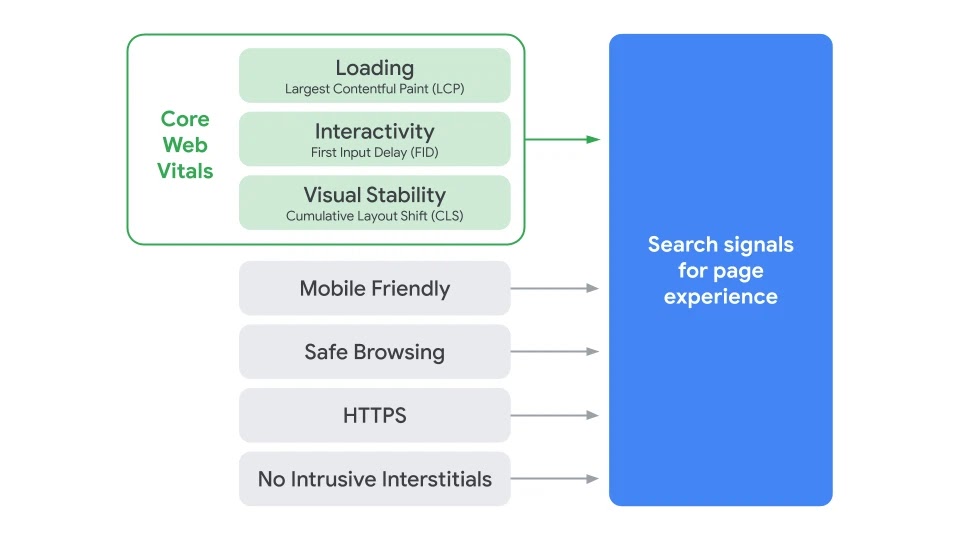
Search Signals for Page Experience Source: Google Search Central
As seen in the above image the “page experience signals” combine Core Web Vitals with Non-core Web Vitals. This blog focuses only on the Core Web Vitals.1) Largest Contentful Paint (LCP)
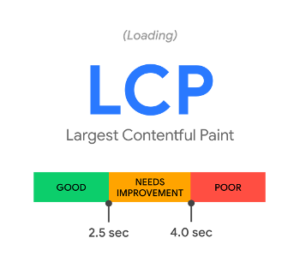
CWV metric 1: Largest Contentful Paint (LCP) Source: web.dev/vitals
The first metric in the CWV is the Largest Contentful Paint (LCP) which measures the loading performance of a web page. A web page consists of many elements such as text, images, videos, among others. The browser takes some time to render these elements. The time it takes for the web page’s largest element painted within the viewport (above the fold) is LCP. Let’s say there is a webpage where above-the-fold content consisting of five paragraphs and two images. The size of the first image is 100KB and that of the second image is 200KB. [aw2.module slug='pullquote' pull_class='float-left'] [aw2.this html] According to Google, a good LCP score is 2.5 seconds or less for the 75th percentile of the page loads segmented across mobile and desktop devices [/aw2.this] [/aw2.module] If we assume that the text size is less than the image size, the image of the size 200KB will be considered the largest element in the viewport and will be shown in the LCP. As of now only text and image blocks visible in the viewport are considered in the LCP metric. In the case of videos, the poster image is considered. The elements contributing to LCP could be different for mobile and desktop views. For mobile view, it could be a text element, but it could be an image for desktop, depending on the layout rendered in the viewport. There would be at least one LCP element on the web page by default.2) First Input Delay (FID)
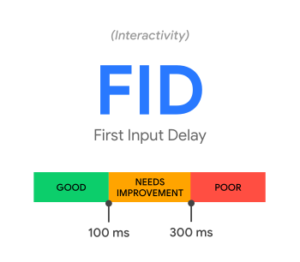
CWV metric 2: First Input Delay (FID) Source: web.dev/vitals
[aw2.module slug='pullquote' pull_class='float-right'] [aw2.this html] According to Google, a good FID score is 100 milliseconds or less for the 95th–99th percentile of the page loads segmented across mobile and desktop devices [/aw2.this] [/aw2.module] The second metric in the CWV is First Input Delay (FID) which measures the interactivity & responsiveness of a web page. Input delay (first one only) is when a user tries to perform some action like clicking a link or tapping a button or typing, but the browser's main-thread is busy doing other important tasks, thus it’s unable to respond to the user’s interaction. The browser’s main thread is responsible for various tasks such as loading the resources, parsing HTML & CSS, building the DOM, executing javascript, along with other important tasks.3) Cumulative Layout Shift (CLS)
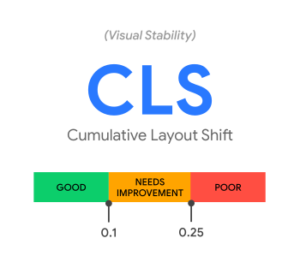
CWV metric 2: Cumulative Layout Shift (CLS) Source: web.dev/vitals
The third metric in the CWV is Cumulative Layout Shift (CLS) which measures visual stability. [aw2.module slug='pullquote' pull_class='float-left'] [aw2.this html] According to Google, a good CLS score is 0.1 or less for the 75th percentile of the page loads segmented across mobile and desktop devices. [/aw2.this] [/aw2.module] Visual stability is achieved when there are fewer or no unexpected layout shifts in the viewport. An example of an unexpected layout shift is when a user is viewing a piece of content and is about to click a menu, but suddenly due to an advertisement, the page layout changes and the user clicks the ad instead of the menu. This layout shift is annoying and causes a poor user experience. The most common causes for CLS are, images without width and height, dynamically inserted content above the existing content or ads, and iframes without dimensions.Conclusion
Google’s Page Experience Update is important (as for every minor or major update) for all stakeholders, from developers to marketers to business owners. This new update will change how the web pages are developed and tested. Before making any new web pages live, it’s now necessary to check the Core Web Vitals in the lab environment. Once the webpages are live they have to be continuously monitored with field data collected from real users and based on the data improve the page experience. We have already included Core Web Vitals in our continuous improvements program. This update is important for us, as we are always looking for ways to continuously improve our clients’ websites.
General
1 min read
(Secret) Santa came to WPoets

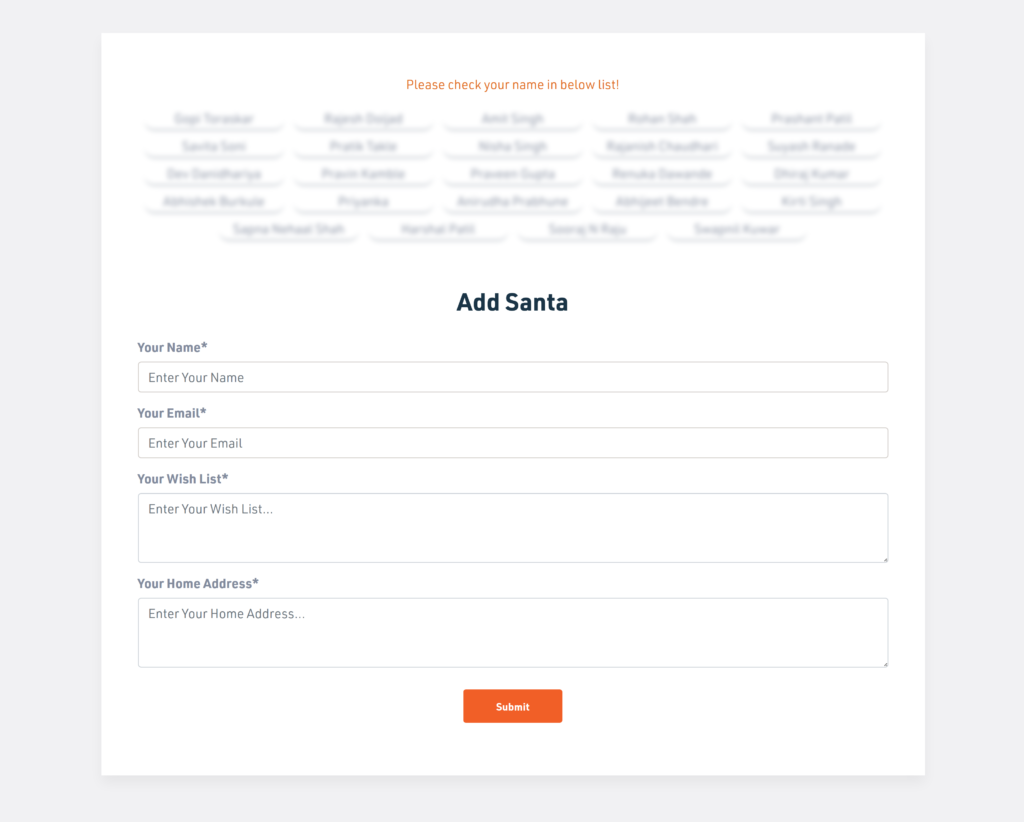
Team Members added themselves as Secret Santa
Team Members added themselves as Secret Santa. Also, they added their wish list along with their address. For drawing the names each member clicks once on a gift box, which is shown randomly. The chosen name and their wish list are emailed to the logged-in user.
Selecting a name to Gift
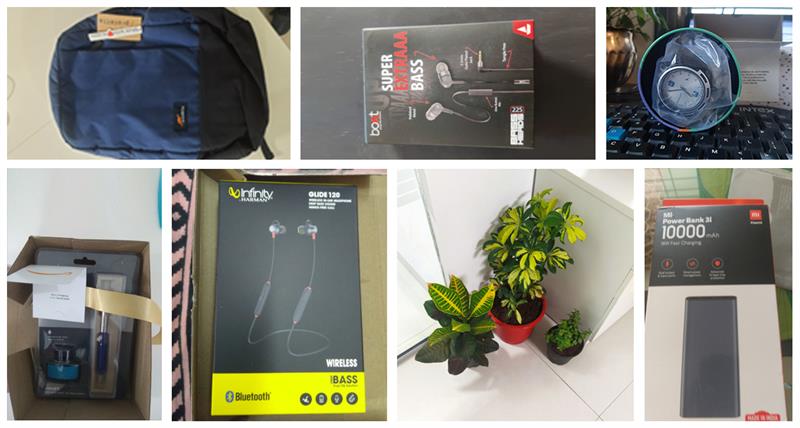
Gifts by Secret Santa
Workplace Christmas celebrations allow us to spend quality time together as a team. Merry Christmas and Happy New Year. Signing off for now. See you next year.
EdTech
8 min read
Top online Platforms that Educational Institutions should use to engage their students amid the Coronavirus lockdown
Introduction
The world is hit by a pandemic caused by coronavirus due to which all the educational institutions such as Schools, Colleges, Universities, Private institutions, have to abruptly & temporarily shut down to prevent the rapid spread of the virus. This is unprecedented where millions of students right from primary schools to colleges are forced to switch to e-learning tools to ensure their educational continuity. Educators are now under extreme pressure to complete the remaining activities such as assignment submission, oral viva’s, practical examinations, summative exams, among others for the current academic year. They are also worried about how things are going to move forward in the next academic year when the entire existing system has collapsed. Many educational institutions have completely stopped their teaching activities, while some institutions are carrying out activities through online tools, emails, and WhatsApp. But the remaining major part has not yet fully adopted or doesn't use online tools at all. The purpose of these tools is to virtually create an environment similar to their classroom so that the students can feel that they are in their classrooms from the comfort of their home. The classroom teaching has few activities- Attendance of students
- Teaching and Learning
- Notes sharing (Presentation / Printed materials / Dictation)
- Assessments (Objective or Subjective, Formative or Summative)
Google Classroom
Google Classroom is built with a purpose to manage teaching and learning online. It helps teachers to create and organize classes, subjects, assignments. Students are enrolled in these classes, are assigned classwork in the form of assignments & quizzes, and have access to shared educational materials. Teachers can post class announcements to all the students or only to selected students. They can track the quizzes and assignments given to students. A detailed progress report, along with the grades of the students, is available all in one place. As expected, the Google Classroom seamlessly integrates with other Google tools such as Google Docs, Google Drive, Google Forms, among others. It's not a full-fledged LMS (as compared to other LMS discussed later in this post), but teachers can quickly configure it and start using it right away. Also, it can scale to any number of teachers and students, thanks to Google's infrastructure. One of the best features of the Google classroom is where Teachers can invite Parents to share summaries of the student’s work. This encourages the parent’s participation in the academic context as they have detailed access to the student’s progress right from the beginning.Your Educational Institution can use the Google Classroom in the following ways
- Teachers can quickly create classes and invite their students to join them.
- A single dashboard to manage all the classes.
- Distribute teaching materials & assignments.
- Easy communication between teachers and students.
- Allows students to take assignments and quizzes.
- It allows teachers to upload educational materials where the students can view them.
| Official Website | https://edu.google.com/products/classroom/ |
| Teacher Center | https://teachercenter.withgoogle.com/first-day-trainings/welcome-to-classroom |
| Help Center | https://support.google.com/edu/classroom/#topic=6020277 |
| Teachers Essential Guide | https://www.commonsense.org/education/articles/teachers-essential-guide-to-google-classroom |
Moodle
Moodle is one of the most flexible tools used by educators for blended learning (mix of both classroom and online teaching and learning), e-learning, distance education, flipped classroom. It’s a powerful learner-centric software that is highly flexible and scalable, which extends both teaching and learning beyond traditional methods, making it accessible for learners any time, anywhere. It’s used by nonprofit, government, businesses of all shapes and sizes, among others, to meet their wide array of learning needs.Your Educational Institution can use the Moodle in the following ways
- Engage students with both online and offline teaching and learning.
- Classes can be instructor-led, self-paced, blended, or entirely online.
- Create courses, share teaching resources to students in the form of PDF, Word, Audio, Video, among others.
- Conduct online exams using quizzes that use pre-built question templates of MCQs, Match the Columns, fill in the blanks, etc.
- Create and share assignments, collect submissions from students digitally (Online text or File submissions). Grade or give feedback on the assignments.
- Moodle has an inbuilt full-fledged file management system, which makes it easy for teachers to upload their teaching materials such as Word Files, Presentations, PDFs. Documents can even be directly imported from various cloud storage services such as OneDrive, Google Drive, Dropbox, among others.
- Teachers can track the progress of each student such as Activity completion & Course completion. All online and offline learning activities can be recorded.
- A calendar to keep track of the various academic activities such as course completion dates, assignment due dates, upcoming quizzes, among others.
| Official Website | https://moodle.com/ |
| Documentation | https://docs.moodle.org/38/en/Main_page |
| Teacher quick guide | https://docs.moodle.org/38/en/Teacher_quick_guide |
| Learn Moodle | https://learn.moodle.org/ |
Zoom
Zoom is a video conferencing service that allows people to meet virtually via audio and video. It is a highly scalable service with real-time messaging and screen sharing, mimicking the classroom environment, perfectly fit for teachers. Video conferencing makes it easier to engage students than any other means. It is a go-to option for teachers to host live classes. It has a simple, intuitive interface with lots of useful options that makes it possible to conduct live classes for even hundreds of students simultaneously. Educational institutions use Zoom for conducting their classes, internal faculties, or administrative meetings; conduct placement drives virtually, among others. This tool makes it possible to extend both teaching and learning beyond traditional classrooms. Students can virtually join classes conducted by their teachers, from the comfort of their home or view recorded sessions later to learn at their own pace.Your Educational Institution can use the Zoom in the following ways,
- Teachers can conduct their classes live or record and share them
- Internal faculties meetings or administrative meetings
- Student Viva’s
- Conduct placement drives virtually, Schedule online interviews.
| Official WebPage | https://zoom.us/ |
| Zoom Training Resources | https://zoom.us/docs/en-us/covid19.html |
Smriti EdTech
Smriti is an EdTech platform we built ground up by working closely with private Schools, Institutes & top NAAC rated colleges. This platform has been constantly improved upon through the feedback from various stakeholders of educational institutions such as top-level management, teaching & administration staff, students & alumni. Although we have discussed Google classroom and Moodle in this blog, we strongly recommend a tailormade solution like Smriti EdTech, which is designed from scratch for Educational Institutions like yours. Note that this platform is not a turn-key solution, which can be installed quickly and be used from day one. Instead, it’s a custom-tailored solution that solves specific challenges that a particular institution may have. It is not another generic ed-tech solution that is out there in the market. We believe that every institution is unique and has its own set of challenges, and this platform is built to solve those challenges. Currently, this platform consists of 20+ integrated modules(Click here to see a detailed list of modules), which are custom developed to solve various challenges that educational institutions face.Your Educational Institution can use the Smriti EdTech platform in the following ways,
- Teaching and learning
- Conduct Online Objective and Subjective Exams
- Track progress of students
- The amount of content that has been consumed by the individual student.
- The number of attempted or completed quizzes.
- Detailed tracking of the given assignments.
- Analytics of the Videos (recorded lessons) such as no. of views, the percentage of video viewed.
- Detailed tracking of the given tasks.
- Master Calendar
Conclusion
All the above mentioned online platforms have different features and are designed for various purposes. Teachers should use them for remote teaching & learning, thus keeping the students occupied. Such use of technology, especially in these unprecedented times, has shifted the entire focus from teachers to students hence it has truly become a learner-centered education. The lockdown has forced the entire education sector to switch to online platforms for their operations. There is no better time than now for all the educational institutions to go online as much as possible. I am signing off for now. See you soon. Till then, stay home and stay safe.










General
11 min read
Awesome Websites : A Subscription-based Fully Managed Continuous Improvement Program
- What is Awesome Website
- Why we created Awesome Plans, a subscription-driven service.
- What we offer
- How we are Different
- How your business can Qualify for “Awesome Website” service
1. What is Awesome Website
Awesome Websites is state of the art service offered by us for developing enterprise websites. It’s based on the continuous improvement process which employs incremental improvement of a website over time, replacing traditional all at once approach, better fit for continually growing and evolving business organizations. [aw2.module slug='pullquote' pull_class='float-right'] [aw2.this html] Awesome Websites is based on a continuous improvement process which employs incremental improvement of a website over time, replacing traditional all at once approach, better fit for continually growing and evolving business organizations. [/aw2.this] [/aw2.module] We consider a website to be “Awesome” when it can demonstrate the following qualities,- Brand:
- The website must reflect and add to the brand proposition of the business.
- Adaptive
- The website should be adaptive and must take advantage of the screen it is on, to show the right information, beyond just a responsive site.
- Enabler
- The website should be beyond a Static site. It should enable business workflows to achieve more with less effort.
- Optimized
- It should be continuously optimized to adapt to its visitor behavior.
- Data-Driven
- The Website should be continuously improved upon with feedback from the Analytics. It should leverage valuable insights hidden in data about the website’s visitors.
- Should do its job
- The website is a vital primary marketing tool. It's an online conversion machine, working in parallel with other offline marketing strategies.
2. Why we created Awesome Plans, a subscription-driven service
The long and short of the story is,“Having created hundreds of websites for the customers over the last 10+ years, we have garnered keen insights on what works, and what doesn’t work for the web. We have distilled these insights into a comprehensive improvement plan for our client’s website and created a subscription-driven program to make their website awesome.”
Let’s elaborate more on it. We have been part of many customer journeys. We have seen what had worked for them and what did not. At times things that had worked for a particular client did not work for the other. Few factors that led us to design Awesome Plans were,Unengaging, non-maintained and outdated business website had a negative impact on its visitors.
[aw2.module slug='pullquote' pull_class='float-left'] [aw2.this html] In the past, we have built hundreds of websites, which languished because it never got updated. It almost stayed the same for a long period of time as they were at the time of launch. It never gave the returns that it should have given. [/aw2.this] [/aw2.module] In the past, we have built hundreds of websites, which languished because it never got updated. It almost stayed the same for a long period of time as they were at the time of launch. It never gave the returns that it should have given. While they performed at its best for a period ranging from a few months to a year or so, but over the period it reached the saturation point, beyond which it was never the same website as it was when it was built. By reaching the saturation point, it didn’t mean that the website stopped working, but it started having the following symptoms,- The website was not visually appealing as it was when launched or as compared to current trends.
- The business had outgrown. It has evolved over the years, but the website doesn't go hand in hand with this change.
- The Website didn't incorporate the change in the marketing strategy of the business which had changed over the period.
- Visitors were not much interested in the website as they were initially.
- The content was not engaging anymore, or even worse, the information about products and services was not up to date.
- The Website looked stagnant and outdated.
Drawbacks of Traditional Web Development process
The clients for whom we were developing websites, always came back with requirements small or big. Once the requirements came in, both sides had to sit and discuss what needs to be built, how its gone be achieved, how much time it will take, and the most crucial part, what is the effort and cost for that change. All good so far, but things we never easy as they looked. Clients requirements would change, even in the later stages of the development, more changes would happen closer to project deliveries which would change the scope of work. To accommodate these changes, we had to re-quote, renegotiate, which affected our efforts and the most critical thing, clients expenditure. On our end, we had to align the resources such as designers, developers, project manager’s etc. across projects according to the need of the hour. And to complicate things more, multiple such projects were running in parallel. This traditional web development process was cumbersome and inefficient, costing time and money for both the stakeholders, we and our clients.Drawbacks of Traditional “Fixed Price Cost” Model
[aw2.module slug='pullquote' pull_class='float-right'] [aw2.this html] Working with fixed price model for website development looked easier, cheaper and more profitable in the beginning. [/aw2.this] [/aw2.module] Working with fixed price model for website development looked easier, cheaper and more profitable in the beginning. However, again, it was not the case as it looked. Clients came to us for either development their website from scratch or some maintenance tasks of their existing website. Whatever the case based on the requirement, the time, cost and effort required for that project or task was estimated. The cost was an important parameter in the estimate. Majority of times, our client’s would need a certain amount of time discussing with all the stakeholders within their organization to allocate the required budget. On our end, we had to take deposits upfront (minimum 50% or more of project cost) to start the work. These upfront costs were a barrier to many customers, and it looked like initial entry cost was high, even if the price was divided into smaller payment milestones. And needless to stay that the project requirement would undoubtedly change. In short Back and forth SOW for changing client requirements, negotiations, and renegotiations of the estimate, rearranging payments milestones, countless amount of time that was spent but not billed, awkward late-payment reminders through emails, phone calls. All these things were costing us in terms of time and money. We knew we needed a better pricing model.Clients needed True partnership, on an Ongoing Basis
Not all of our clients were tech-savvy. Most of them wanted to offload their technical requirement to a team of experts who are reliable, talented, experienced and most importantly, who are willing to take responsibility for their business website. [aw2.module slug='pullquote' pull_class='float-left'] [aw2.this html] We defined our services and Bundled them into a subscription model called “Awesome Plans.” [/aw2.this] [/aw2.module] Also, the client’s didn't want to invest internally hiring tech team and manage them by themselves. All they wanted is access to the tech team, which is always available, listening to them whenever they are in need. Going through these factors mentioned above, some trial and error tactics, connecting the dots from the experiences that we had, We came up with a bespoke solution which addresses almost all the problems and most importantly which will work for broad categories of clients.3. What we offer
Currently, as of now writing this blog post, we have three subscription plans. Depending on the client's needs, they can choose a plan which is the best fit for their business. Following Awesome Plans are available,- BASIC: Business Websites
- A starter plan designed for targeting entry-level SMEs
- PRO: Marketing Portals
- Best suited for mid-level SMEs
- EPIC: Business Workflow
- Best suited for Enterprise clients.
4. How we are Different
Being a part of the Software industry, specifically being into the WordPress ecosystem, there are N number of Companies, Agencies, & Freelancers who offer WordPress based services which are more or less similar. [aw2.module slug='pullquote' pull_class='float-right'] [aw2.this html] The fact that we incorporate “Continuous Improvement Process” to build “Awesome Websites” sets us apart from the rest of the service providers in the same niche. [/aw2.this] [/aw2.module] Making it extremely difficult for prospects to choose from these options. The following section describes how we are different and how our solutions are better than similar competitors in the niche.Business Solutions based on Continuous Improvements
The fact that we incorporate “Continuous Improvement Process” to build “Awesome Websites” sets us apart from the rest of the service providers in the same niche. Traditional website development approach leads to a website which is stagnant, non-maintained, outdated. CI approach breaks from this conventional way, to continuously improve and deliver a website which will always be fresh, up-to-date and on the cutting edge. [aw2.module slug='pullquote' pull_class='float-left'] [aw2.this html] Having years of experience under our belts and diverse expertise helps us take up and solve the complex business challenges. [/aw2.this] [/aw2.module]Reliable Experts that can be banked on
We are a team of experts who are creative, talented, reliable, professional and experienced. Having years of experience under our belts and diverse expertise helps us take up and solve the complex business challenges. And the most important part, we take full responsibility for our clients business website.Services Beyond Traditional Retainers
Our services go beyond traditional retainers. Traditional retainers generally consist of following services- Free Hosting
- Uptime Monitoring
- Daily Backups
- Minor Tweaks, Fine-Tuning of the website.
- Plugins and Theme updates
- Virus and Malware Scanning
- Proactive changes to the site every month
- Designing and Developing of
- Landing Pages
- Newsletter Templates
- Analytics & Monitoring
- Awesome Apps
- Complimentary Mobile Apps (running parallel with the Business Website)
- Unlimited Help and Support
- Development of Custom Workflows
We offer True partnership
We believe in delivering solutions that solve real business problems. We are with our clients on every step of building their “Awesome Website” right from planning, development, testing to launching it and beyond. [aw2.module slug='pullquote' pull_class='float-right'] [aw2.this html] Our clients consider us an extension of their team working collaboratively with them on solving their toughest online challenges. [/aw2.this] [/aw2.module] Our clients consider us an extension of their team working collaboratively with them on solving their toughest online challenges.Beyond SOW
Instead of leaving client projects stuck in the pipeline due to renegotiating terms, the scope of work, cost estimates, payment milestones etc., with Awesome Plans subscribed to our clients, and we focus on getting things done.5.How your business can Qualify for “Awesome Website” service
When we designed “Awesome Website” we knew it’s not meant for every website on the planet. We knew for which businesses it’s the best fit and for which it was not. We wanted to work with Clients which resonated with us on the following points,The Website is Not just an online brochure, but a serious marketing tool
[aw2.module slug='pullquote' pull_class='float-left'] [aw2.this html] Building a website and launching it is not the goal. Running it in a way to maximize its potential should be the goal. [/aw2.this] [/aw2.module] A website helps business in building its identity, trust, and reputation. Basically, it's an online conversion machine. We want to work with companies who are serious about their website, who think their website as one of the primary Marketing tools and wanted to harness its power.Can understand Continuous Improvement Process benefits
Building a website is not a one-time event. It may work for a countless number of sites and is nothing wrong about it, but it has its drawbacks. We want to build reliable, scalable, stable, well-maintained web portals for our clients which can only be achieved by continual improvements over time delivering outstanding results to our clients and their customers.Ready to shift towards a long-term mindset
“Rome was not built in a day.”
You can download a free theme, customize it a bit, add content to it and make the website live in a few days. Building a website and launching it is not the goal. Running it in a way to maximize its potential should be the goal. Shifting towards a long-term mindset has its benefits,- Increase Brand Awareness
- Improve visibility in the search engines hence increase in website traffic
- Generation of qualified Leads which will drive more conversions
- Establish a connection with the target audience through fresh content and design.
Lastly Budget
“You get what you pay for.”
We want to work with clients who are ready to invest in their website. Having a budget allocated helps to focus on the problem at hand, which is more important than anything else. Our pricing is transparent. This allows our potential clients can have a better understanding of what they are paying, and what value they are getting for that investment. We have also listed down all the features of various plans in a comparison table so that it becomes easy for them to compare and choose which plans fit in for their budget.Conclusion
The primary goal of this article is to give a brief introduction to Awesome Websites service offered by us to our potential future clients. On the closing thoughts, we expect the readers of this article, especially prospects to think about the benefits that this service will bring to their business. Take the first step, subscribe to our Awesome Plans, then sit back & relax. Let us take care of your business website.
EdTech
10 min read
Why Educational Institutions should Automate their Admission Process
The challenges of Manual Workflows in the Admission Process
The educational institution's admission office is full of the hustle and bustle, especially during the peak admissions period. It's stacked with long queues of students who want to take admissions. The administration staff is busy with registration and enrolment processes. Presently, several educational institutions have not adopted the technology to the fullest. Their management still trusts the manual process for 'behind the scenes' work; which includes a student registration process, fees procurement, admission verification, among others. [aw2.module slug='pullquote' pull_class='float-right'] [aw2.this html] The manual admission process is not only tedious and frustrating but also highly stressful and prone to errors. [/aw2.this] [/aw2.module] The manual admission process is not only tedious and frustrating but also highly stressful and prone to errors. Your in-house administration staff's time is fully occupied, handling the sequential admission process of hundreds of students. The administrative staff is also busy doing repetitive & tedious tasks, which takes up a lot of their time, ultimately resulting in less productivity. They work very hard to complete the entire admission process on time. Along the way, they also have to resolve any discrepancies and errors that emerged by the manual process. In short, they end up being frustrated. This frustration will have a negative impact on students and can lead to dissatisfaction, as the admission lacks the kind of efficiency it needs. On top of that, the students and parents are stranded in the long queues of admission application submission and fee payments. They are left with no alternative but to follow the manual process conducted by the educational institutions.Solution - Automate the Admission Process
With the increasing number of students taking admission in the academic institutes, the need for having a solution to manage, simplify, and streamline student admissions has become imperative. [aw2.module slug='pullquote' pull_class='float-left'] [aw2.this html] The enrollment module of the Smriti EdTech platform is designed in such a way that it will reduce the pain points of the admission process that your institution face. [/aw2.this] [/aw2.module] Smriti EdTech's enrolment module automates the entire admission process, providing a hassle-free experience to both students and the institution's staff. It takes out the headache of managing the entire end to end admissions lifecycle making it more efficient than ever. The admission process is the first actual interaction of students and parents with the educational institution. By automating the admissions process, it makes a good impression on them, boosting the brand identity of the institution. The enrollment module of the Smriti EdTech platform is designed in such a way that it will reduce the pain points of the admission process that your institution’s face. It lets you efficiently manage the overall admission process in the following ways:- It enables you to manage your entire admission process from one place (Dashboard), thus saving your staff's time. It also reduces the complexity of the process, making sure that it's error-free.
- It provides you with a real-time view of the prospective student's pipeline along with the stages in which they are.
- It provides insights about the entire enrollment process, which allows your institution's management team to help identify the challenges of the admission process. They can take quick measures to increase admission conversions based on these insights.
- Since the admission process is automated, it requires less human intervention, thus freeing your staff for more productive work.
Benefits of automating the Admission Process
Smriti EdTech's enrollment module automates the entire end to end lifecycle of the admission process for all types of educational institutions whether its Schools, Institutes or Colleges. This platform not only streamlines the admission procedure but also provides a better experience to the students. Following are the benefits achieved by automating the enrollment process,1.Convert Your Potential Admission Enquiries
The ultimate aim of having automation in the admission process is to simplify the operations and maximize the enrollment of new students, along with retaining qualified students. The admission module of the Smriti EdTech Platform helps you in providing the right insights of overall admission inquiries, how it has been progressing, and how many seats are confirmed. This educational software provides you with intuitive admission automation, designed to capture maximum student leads so that they can be transformed into sure shot admissions. For Schools, this module allows the parents to check the admission eligibility of their child online, submit the school admission application, upload the various documents from the comfort of their home. The admission inquiries are collated centrally. The school staff can conduct the necessary processes such as sorting the admission applications, reach out to the prospective parents to schedule admission interviews, waiting list management, etc., thus helping convert the inquiries into admissions. The streamlined online admission registration process makes the job of your administrative staff easier and efficient by reducing errors, manual paperwork, and redundant administrative chores. For Institutes, your admissions team can easily reach out to potential students who have enquired, can schedule counseling sessions, and follow-up with them. All the communications history such as SMS, emails, call logs are maintained in one place. For Colleges, they have to go through a centralized admission process for first-year students. This module allows colleges to have a custom online admission process so that they can admit students who have qualified the common entrance tests conducted by Statutory Central Admission Authorities. For the rest of the student's admission is conducted similarly. [aw2.module slug='pullquote' pull_class='float-right'] [aw2.this html] The lead stages can be tracked as the prospects move through the admission funnel, thus saving time for your admin staff on scrutinizing the same. [/aw2.this] [/aw2.module] The admissions automation feature captures required student's information and does the routing of applications based on the program/course selected, caste or category, and other influential parameters. It also detects whether a new student or existing student is taking admission depending on CET number. or PRN entered. Also, the lead stages can be tracked as the prospects move through the admission funnel, thus saving time for your admin staff on scrutinizing the same.2. Minimize the Manual Data Entry Process
The influx of students taking admissions is increasing day by day. The academic institutes have a hard time to cope up with this scale of the enrollment process. Also, they have to work with lesser resources along with traditional manual systems. [aw2.module slug='pullquote' pull_class='float-left'] [aw2.this html] The manual form filling process is completely eliminated as the students and parents can fill online admission forms at the comfort of their home, without coming to the institution campus. [/aw2.this] [/aw2.module] Manual data processing is time-consuming and full of errors. The administration staff enters the data collected from the paper-based admission forms into excel sheets. This process is more error-prone since the data entered might be wrong due to incomplete information, unrecognizable handwriting, among others. Smriti Edtech's admissions module digitally stores almost all information of the admission process. The students apply for admission through online registration forms. The manual form filling process is completely eliminated as the students and parents can fill online admission forms at the comfort of their home, without coming to the institution's campus. The digital scan copies of mandatory documents are uploaded to the system hence removing the need for storing and managing them physically.3. Your Students Admissions Data is in a Single place
Your institution's staff is already struggling to streamline the admission procedures. On top of that, all the student's data is scattered in various paper-based forms, stored in file cabinets. Some institutions are implementing a slightly better solution of entering the student's data into excel sheets. It has its own challenges. Over the period as the number of enrolled students increases, it becomes challenging to manage students data in one excel sheet. Also, to recall students information year, program, branch, and department wise becomes difficult and time-consuming. The worst part is, these excel sheets are shared among various members through emails or pen drives, making it difficult to maintain one version of the excel sheet which consists of the up to date information of the students'. This problem scales as the number of students enrolling for various programs & courses increases. And even worse multiple versions of the excel files are created with names like 'final,' 'copy of final,' 'final of final,' 'final version 1' etc. Smriti EdTech's admission module gives you a complete view of data generated from the admission process conducted for different programs or courses. Your institution's data is stored in one central location, with zero redundancy. [aw2.module slug='pullquote' pull_class='float-right'] [aw2.this html] You can manage the student data from multiple campuses through a single dashboard. [/aw2.this] [/aw2.module] Your in-house staff can retrieve, monitor, and analyze the students and their admissions data whenever required. The details such students personal information, program/course they have enrolled, uploaded documents, along with the information of fees paid is available on demand. Not just that, you can manage the student's data from multiple campuses through a single dashboard.4. Collect Fees from the Students using Credit or Debit Card, Mobile Wallets & UPI
Fee collection is the most crucial component of the admission process. Educational institutions can collect fees from the students, through online payments by Credit or Debit Card, Mobile Wallets & UPI, among others. [aw2.module slug='pullquote' pull_class='float-left'] [aw2.this html] Educational institutions can collect fees from the students, through online payments by Credit or Debit Card, Mobile Wallets & UPI, among others. [/aw2.this] [/aw2.module] After the students submit their online admission application, they can view the fee structure, including its components and pay for it. These fee components are pre-configured depending on the program, course, caste, or any other parameter. Late fees & super late fees per day, along with their collection start and end dates can also be configured. Partial fees can also be collected from students in the form of installments. Automatic reminders can be sent to students who have opted for partial payments for the next installment or whenever they have any overdue payments. In short, the students or their parents can directly pay all types of fees without traveling to the institution's campus.5. Make more informed decisions with Real-time, Data-driven & On-demand Reports.
Smriti EdTech's enrollment module gives you real-time insights about your entire admission process. Insights such as, how many total numbers of students have applied, what's their status and how the admissions are progressing at every stage. It provides you with accurate information which lets you figure out how good are the enrollments for the year, have they increased or decreased, etc. You can generate customized reports of the accounts of the institution to keep a record of the money flow throughout the year. Real-time, data-driven, easy-to-visualize & on-demand reports can be generated, which helps decision-makers to make more informed decisions related to admissions. Student wise reports of fees received, outstanding fees, installments, can be generated based on daily, weekly, quarterly, yearly, or for a custom date range.Conclusion
Smriti EdTech’s Enrollment Module is equipped with the necessary features for the automation of the admission and enrollment process. The entire flow of admission is taken care of. This Module is custom-built ground up catering to the different needs of educational institutions viz Schools, Institutes & Colleges. There are many benefits of automating the admission process, but one of the main benefits is that it reduces the overall costs of operation by digitizing the entire process. It lowers recruitment costs and effectively optimizes the resources. It also ensures a seamless flow of communication with students using web & mobile devices. It also provides your institution with the real-time information and analytics of how the process is performing. Based on that, you can make informed decisions, continuous improvements & work on the flaws of the process. Lastly, it lessens the time required for the execution of the entire admission life cycle from weeks to a few days. To learn more about how Smriti EdTech's enrolment module can automate the admission processes of your educational institution get in touch with us today.
EdTech
11 min read
Make Educational Institutions Smarter using Smriti EdTech Platform
How Smriti makes Educational Institutions Smarter?
Smriti Edtech Platform offers a holistic approach to facilitate smooth management of the entire educational institution's affairs. It has got all the necessary modules that are needed to manage the institution efficiently.1.Enrollment Module
Enrollment module handles the entire enrollment life-cycle right from online admission application to fee collection to enrolment. It replaces the manual admission process which is tiring, time-consuming, stressful and error-prone for both administrative staff and students. Enrollment module automates the entire admission workflow, eliminates duplication of work, hence reducing the overall cost of operations & enabling better utilization of resources. Educational institutes can collect students fees online, replacing time-consuming, mundane standard fees collection process through cash, cheque or DD. Admin department can track stages and statuses of almost n number of students in real time. The entire time required for the execution of end to end enrolment process is reduced from weeks to a few days. Enrollment Module makes Educational Institutions smarter by following ways,- Technology-driven, automated & smart admissions processes.
- Less administrative work hours per week required for handling admission processes.
- Eliminate admission bottlenecks and simplify operations with online admissions.
- Accept fee payments online from students, eliminating the need for manual fee processing in the form of cash, cheque or DD.
- Data-driven based decision making, due to availability of information stored digitally.
- End to end digital processes online admission application, digital scan copies of documents are uploaded instead of Xerox copies, online fee payments.
- Daily reports generated, exported & mailed to authorized persons consisting the details of fee collections.
- MIS reports can be generated giving a clear picture of admissions & cash flow.
2. Assessment Engine
The learning process is not deemed completed unless it's assessed. Whether learning has happened in the student can only be concluded with assessments which are then evaluated. This module lets you quickly create comprehensive online assessments using pre-built question templates such as MCQs, MRQs, Drag and Drop, Match the Columns, True or False, Fill in the Blanks, among others. These electronic assessments allow faculties to quickly evaluate the performance of the students and give them instant feedback so that they can improve students who are weak. Assessment Module makes Educational Institutions smarter by following ways,- Create and manage online assessments, such as practice tests & quizzes.
- Teachers can build a question bank which is used to create online tests.
- Conduct tests periodically instead of summative assessments.
- Effective assessment of students at individual performance level
- Go paperless, by conducting online examinations.
- Conduct class tests, practice tests or test at home on mobile devices.
- Custom reports of online assessments help teachers identify problem areas in students so that they can improve them.
3. Learning Module
This module helps in delivering content through a new type of learning model called Blended Learning, which is a combination of offline (face-to-face, traditional learning) & online learning. The content is delivered through computer or smartphones thus providing an interactive learning experience. The backbone of the Learning Module is the Learning Management System (LMS). Faculties can collaboratively create, arrange, publish & manage the learning content using LMS. Various content types such as text, images, audio & video can be bundled together to create engaging and interactive learning content. Exercises & quizzes can be mixed in between the learning content, which allows teachers to gauge if students have grasped the concepts. Teachers can track the progress of the students such as how much learning content they have consumed & their performance in exercises & quizzes. Learning Module makes Educational Institutions smarter by following ways,- Allow students to study anywhere, any time, at their own pace using Mobile Apps.
- Integrate blending learning approach in the institution.
- Using LMS, faculties can deliver interactive & engaging learning content.
- The teacher can track students learning progress, identify struggling students to help them in their studies.
- Learning is no more passive activity; it’s active by practicing online learning.
- Students have access to helpful resources such as course material, lecture notes, presentations, sample question papers & question banks, among others, through web and mobile apps.
4. Certification Management
With certification management module; students can easily request attendance, character, bonafide, transfer & certificates. Traditional certificate request process consisted of manually filling form application, submission of xeroxed copies of supporting documents, filling bank challan to pay by cash, then submit one part of challan to the educational institution. Staff then handwrites the student information in the certificate & issues it to the student. Using Certification Management module the students from anywhere can request for various certificates online, upload scanned supporting documents, pay the certificate fees online. The certificate generation request goes to the authorized personnel who then verifies the details & documents. Once verified the certificate could be downloaded, printed on the institutional letterhead, get it signed from signing authority, finally issued it to the students. Certification Management module makes Educational Institutions smarter by following ways,- Track history of certificates that are issued to the students.
- Eliminate the need to maintain paper-based applications, xerox copies of supporting documents. All the data is stored digitally.
- Payments are made online by students.
- Cuts downs the entire certification generations process to just verification of application & documents to printing the certificate.
- Just download the requested certificate, print it on letterhead, (student details are pre-populated from the database), get it signed & stamped from the authorities, issue the certificate to the students.
- Students can collect the certificate from office counter or can receive it at their home by courier (for those who demanded it.)
5. Placement Platform
Placement Management System helps educational institutions to automate their placement activities. Employers can post jobs or internship opportunities, be it a campus or walk-in drives, send notifications to all the students, view student profiles & resume or CVs, shortlist students, conduct, track & manage interviews, give interview feedback to students. TPO’s can maintain the academic information of students such as students profile, digital mark sheets, the progress of students, shortlist & recommend students that match employers criteria, share students profile and resume online. Placement platform also helps to track students through various stages of the interview process, resolve queries of employers or students. Students can create and maintain their multiple job profiles; upload resumes/CVs, search and apply for jobs. They can follow the companies which they are interested in and get real-time notifications of opportunities. Up to date information on various stages of the placement, activities are available to them. Placement Platform makes Educational Institutions smarter by following ways,- All the information is stored digitally like student profile, mark sheets, resumes or CVs.
- TPO’s from one place can manage entire recruitment activities.
- The employer has all the access of students information, can conduct campus or walk-in drives, shortlist students based on the requirements.
- Students can manage their profiles online along with documents such as mark sheet and resumes or CVs.
- Only eligible & interested students are in the loop of interview process saving the time of all the stakeholders.
6.Student Dashboard
Students dashboard is a section of a portal for students, where all the information about their profile, parental information, fees details, attendance & even health information is maintained. Students can upload assignments, submission or project work, have access to learning materials, can attempt quizzes and complete exercises, also get notified about events, placement or internship opportunities. Student Dashboard makes Educational Institutions smarter by following ways,- The administration, as well as students, can view and manage their details from one place.
- It lets students manage their profile, upload profile photo & necessary documents such as aadhar card, caste certificate, among others.
- They can upload their assignments, view their attendance or even pay the outstanding fees.
- All the communications can be handled from one place,
- They can view the entire academic calendar consists of important dates such as
- Start & end dates of Registration, Admissions, Fee payment,
- Detailed Program/Course schedules
- Commencement & Conclusion of teaching Semester wise
- Official Holidays calendar
- Sessions / Viva Dates, Submission of Term work
- Schedule of Internal, Oral/Practical Exams & University exams.
- Notifications about workshops, seminars & conference conducted in the campus.
- They can also view Master Timetable and plan their studies accordingly.
7. Events Module
Smriti EdTech’s event module delivers a rich event management functionality, that has easy and user-friendly configuration capabilities, so that the entire event lifecycle right from events sign-up, attendance, to collecting post-event online feedback, can be managed from one place. It is specially designed for the educational institutions so that they can manage online registration and ticketing for various events hosted on the campus. Attendees can register online for the events, pay the ticket fees online. A notification email / SMS is sent to the attendees along with e-ticket thus completing the process of registration. Event Module makes Educational Institutions smarter by following ways,- Go paperless by digitally handling all the event process right from online registration, online secure payments processing, mail /SMS e-tickets to attendees.
- Configure ticket prices dynamically, allow early bird discounts, generate coupon codes, limit the no. of registrations.
- Allow discounts to students & faculty of the institution & bulk registration discounts.
- Display the entire event calendar along with its information such as venue details, timings & capacity.
- Eliminate data entry, streamline, simplify and automate almost all the processes of the events.
- Accept digital payments.
- Real-time reports to get a more accurate count of expected attendees, tickets sold, revenues generated.
- Allow attendees to register any time whether even after office hours.
8. Feedback Module
Feedback Module helps collect online feedback from all the institutional stakeholders viz students, parents, teachers, alumni among others. It also helps in conducting online surveys. If educational institutions are not collecting feedback, they will be not able to gain other people’s insights, opinions, and reviews. They may miss out any opportunities for improvements. Problems & issues in the institutional processes or operations may go unnoticed. It may also give the wrong message that they are not listening. If educational institutions are collecting manual paper-based feedback, it has its own set of drawbacks. Manually conducting surveys or collecting feedback is a lengthy & cumbersome process which consists of the distribution of the forms to the respondents, collecting them back, entering responses into a computer, analyzing the results, generating & sharing reports, acting on the feedback obtained. They are resource intensive as well since it needs a workforce to distribute the questionnaire, collect them, transfer the responses to a central location where it can be processed. It's also an expensive affair as it includes printing & making copies. Feedback and surveys conducted online have lots of benefits. The information entered by the respondent is stored in the database making it easy to mine this data. Real-time graphs and charts can be generated which helps in making more informed decisions. Feedback Module makes Educational Institutions smarter by following ways,- Collect feedback & reviews, conduct surveys online through the web or mobile apps.
- The teacher can give feedback on student's performance, or students can give feedback on their teaching, thus helping both of them to improve continuously.
- All the stakeholder's viz students, employers, alumni can give their suggestions through a structured feedback system which if required can be made available publicly for review.
- Annual survey of student satisfaction on various aspects or functions of educational institutions can be conducted.
- Since all the feedback is collected online, various reports for analysis can be dynamically generated, helping decision makers take necessary actions, plan future policies to improve the overall quality of the education.
- Students and Parents feedback on admission processes, institutional facilities, curriculum & teaching methods or overall academics can be collected.
- Feedback analysis can be shared with NAAC and other accreditation agencies.
9. Alumni Module
This module helps maintain alumni records and contact information. Alumni can create their profile, connect with their batchmates, browse the alumni network or even post job and internship opportunities. It also keeps them updated with the latest news & events, information about the progress of the institution. Educational institutions can create and run online fundraising campaigns and collect donations from alumni. All the donations can be accepted through online payment gateways. Alumni Module makes Educational Institutions smarter by following ways,- Alumni through their portal or mobile app can create or import their profile from social networking sites.
- It helps build alumni directory with up to date information such as their name, graduation year, branch/stream from which they graduated, contact details, employment details such as job title, place of work.
- Alumni are updated with the latest news & events, along with the progress of the institution.
- Alumni can collaborate with peers, teachers, and staff members.
- Create and run online fundraising campaigns and collect donations from Alumni through online payment gateways.
Conclusion
Smriti EdTech platform can transform the way Educational Institutions used to work. It's a SAAS based platform that streamlines everything right from student admission to managing alumni information. It offers a holistic approach to facilitate smooth management of the entire institution's affairs. Feel Free to connect with us - We would be Happy to cater your Educational Institute’s need.
General
5 min read
Avoid these Most Common Onsite WordPress SEO Mistakes
Permalinks not optimized
Permalinks are the permanent URLs ( ideally should never change hence permanent ) to individual pages and blog posts. There are two steps for optimizing permalinks for SEO as described belowStep 1
WordPress Supports different types of URL structures such as- Default - http://www.sample.com/?p=123
- Post name - Sets the URL to WordPress Page or Post name http://www.sample.com/sample-post
- Custom structure - One example is /archives/%year%/%monthnum%/%day%/%postname%/.
Step 2
Once the structure is finalized, the next thing in Permalink optimization is to ensure that each of the permalinks has keywords into it. For e.g. the keywords that are targeted for the current article are- common seo mistakes
- seo mistakes
Images Not optimized for SEO
Optimization of the images from an SEO perspective is another most common WordPress SEO mistake that users make. By optimizing the images for SEO we mean the following things,Image Filename
Search engines cannot see an image; they can only identify an image through the text. The first thing to do is to set an image file name which contains rich keywords. Focus Keyword can be used for the featured image. For every other image make sure it contains keywords from the keywords research that you have done.Image ALT text
For some reasons, if the images can’t be displayed to the visitor, there will be descriptive text shown in the place of the image from ALT text. So make sure to enter rich keywords in ALT text. For a detailed way to optimize the images for search engines go through this article here.No interlinking between the Pages
Interlinking is SEO terms can be described as let's say content in a blog post can be linked to other content on the same site which could be another blog post or even a website page which is relevant to the article from where it's linked. This kind of interlinking makes sense since the reader might be looking for another piece of content similar to what he is reading. Interlinking gives search engines an idea of the structure of the website. That’s one aspect. Another aspect is when search engines encounter linking of the pages with the relevant pages containing relevant content; they are more likely to understand your site better. Another benefit from it is, it increases user engagement increasing the website’s authenticity.No Links to the External Websites
Adding trustworthy, authoritative, and relevant external links which contains high-quality content will help your website appear to be an authority, which in turn increases the credibility of your website. Throughout the content, the reader might need valid references, resources which would more help understand the content better or even putting things into context. By doing this, Search engines can learn from whom you link to and how. Also external linking also a kind of endorsement of third-party content which may encourage them to do you a favor of linking back to your site. The more other websites link back to your content, the higher the chances your site appear the Search Engine Results Pages (SERPs) However, adding poor-quality links will backfire, so before adding any external links make sure if they are needed and have that much of importance.Not having an XML sitemap
A site map is a directory of all the links on a website typically listed in a logical hierarchical order. An XML sitemap consists of all the links with its metadata such as- URL location
- The full URL to the webpage
- Last modified date of the page
Entirely depending on Plugins for SEO
This is not at all an onsite technical SEO issue, as we discussed throughout this article. However, it's an important point which should be discussed. Even if you are using top-notch SEO plugins such as Yoast or All in one SEO PAck and among others for WordPress, but if you are not following basic SEO guidelines then you are killing your SEO efforts. No doubt these plugins do all the heavy lifting required for SEO, assisting you throughout its entire life cycle but still, it does not replace the efforts needed for a good SEO.Wrapping Up
Although we tried to list down important WordPress SEO mistakes, still there are a lot more things that can go wrong and needs to be taken care off. This list may look as incomplete; maybe we will write a part two of this article for further SEO mistakes in which can be avoided. For detailed inquiry about WordPress website, connect here.
General
5 min read
Top 10 Reasons You Should Choose WordPress for Your Business Website
1. It Is easy to learn, Use and Manage
One of the significant reason why business entrepreneurs choose WordPress over other options is its relatively easy to learn, use and manage. Learning WordPress is very easy. There are n number of tutorials, guides, how-to articles and videos, e-books free and paid, all available at our disposal. It's easy to use interface helps to manage the content on the site a breeze. Also, there are inbuilt features provided through admin dashboard such as managing users and their roles, blog comments, RSS feeds, Posts & Pages with their revisions, installing and updating third-party plugins and much more.2. Google Loves WordPress
 WordPress primarily being a blogging platform is full of content. It consists of Posts & Pages containing text, images & videos, etc. Content is loved by Google and is one of the main reasons why Google loves WordPress.
Next, the search engine friendly features of WordPress (along with the integration of third-party plugins like Yoast ) makes sure that the necessary information is available for search engine spiders to consider, relevant to keyword searches that are done.
SEO friendly features of WordPress are,
WordPress primarily being a blogging platform is full of content. It consists of Posts & Pages containing text, images & videos, etc. Content is loved by Google and is one of the main reasons why Google loves WordPress.
Next, the search engine friendly features of WordPress (along with the integration of third-party plugins like Yoast ) makes sure that the necessary information is available for search engine spiders to consider, relevant to keyword searches that are done.
SEO friendly features of WordPress are,
- It lets configure Permalinks ( search engines friendly unique URL )
- It allows us to set the Title & Description of the Page or Post.
- In the content part, it has an easy way to add images with their captions and alt tags.
- Its editor allows editing content with relevant Keywords.
3. WordPress wears many hats
WordPress “wears many hats,” means it can be used to build any website. It was originally was created as a blogging platform, but with the time, it evolved and now has transformed into an amazingly flexible, easy to use, robust website design and developing tool. Few examples of what can be built using WordPress- Personal Blog or Website
- E-commerce Website
- Membership Website
- Forums
- Knowledge Base Websites
4. Mobile Friendly
Google officially says that it's using the mobile version of the content for indexing and ranking. Which means it will not entertain websites, which are not mobile friendly. When you build your website on the WordPress platform using themes and plugins which are built with the mobile first approach, then you don’t have to take up that added effort to make it mobile-friendly.5. Ease of Integration of Third Party Services
WordPress can integrate with the most popular platforms which could be social media networks such as Facebook, LinkedIn & Twitter, Payment gateways such as PayPal 2checkout, Email campaign services like Aweber, MailChimp, and much more. These numerous integrations can boost your business website depending on what kind of type it is. Connect with your WordPress Experts here to guide you in Integration of Third Party Services.6. Safe & Secure
Another primary reason for switching your business website to WordPress is the security measures it offers to its users. The WordPress community is consistently working on the newer safety measures of the CMS, and periodically releasing it to the public. Whenever there is a new update of WordPress available, it will be notified in the WordPress Dashboard. From version 3.7 WordPress provides its users with Automatic Background Updates. Having said that, WordPress security is not just about its core framework. It also has Plugins and Themes which are majority developed by third-party developers. In that case, certain safety measures such as, avoid downloading the Plugins and Themes from unknown sources, download them from trusted sources, making sure that all the Plugins and Themes are up to date & among other things should be practiced. Also using top security plugins such as Wordfence or Sucuri Security will help further tighten up the website security. Lastly taking regular backups is of utmost importance. For more details regarding the security of WordPress read this article.7. Inbuilt Roles and Capabilities framework
WordPress has the concept of user roles and capabilities. It helps site owners (who are not the sole one to run their business website) to create users and delegate tasks to them. Below is the list of roles of WordPress.- Super Admin - Gives complete access to the website.
- Administrator - Is provided access to the administration features
- Author - Makes it easy to manage and publish the day to day Posts
- Editor - Has an authority to publish the Posts, as well as remove or approve other member’s post.
- Contributor - Is given access to manage and write the Posts, however, have to rely on the administrator’s approval.
- Subscriber - Is provided with an authority to view and edit own profile.


